Discover how to create AI-driven personalized email marketing campaigns that drive engagement and revenue in 2026.
Understanding AI and Its Role in Email Marketing
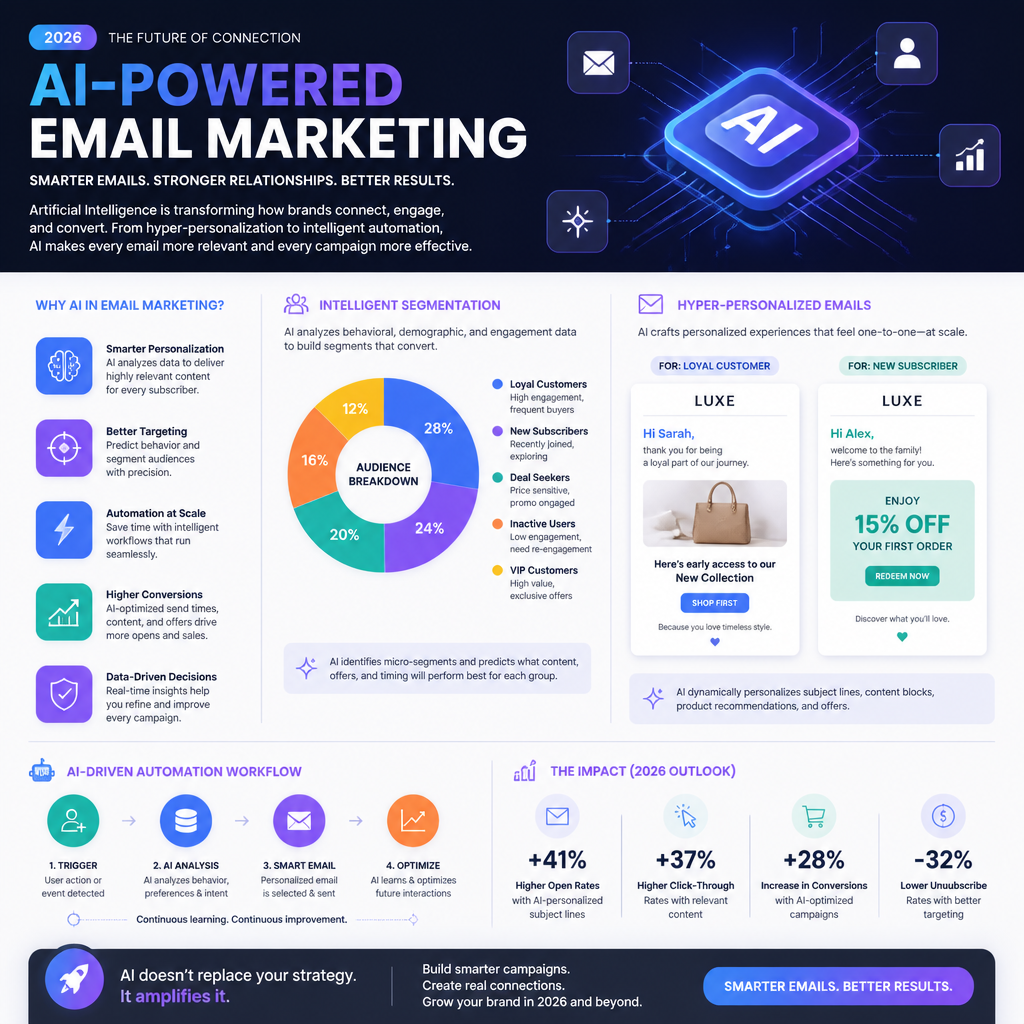
AI in email marketing is mostly about pattern recognition at scale—not magic copywriting robots. In practice, you’re using machine learning models (either built into your ESP/CRM or layered on top) to do four jobs:
- Predict what someone is likely to do next (open, click, purchase, churn).
- Classify people into segments that actually behave differently.
- Recommend content (products, articles, offers) that fits their observed intent.
- Optimize timing/frequency so you’re not hammering inboxes.
Here’s the part people skip: AI only works as well as your inputs. In QA terms, garbage in → confident garbage out.
What “AI-powered personalization” looks like in real life
A good AI-driven program usually relies on a small set of reliable signals:
- Engagement signals: opens/clicks (yes, opens are messy now), site sessions, time on page, scroll depth.
- Commerce signals: last purchase date, product categories purchased, AOV, returns.
- Lifecycle signals: new subscriber, active buyer, lapsing, churned.
- Stated preferences: quiz answers, email preference center selections.
And then you apply those signals in ways that don’t overcomplicate the system.
A real example (and why it matters)
Coca-Cola is often cited for using AI insights to drive personalization in campaigns. The “Share a Coke” personalization angle is a clear example of using customer preference signals and feedback loops to shape what people see and buy (Mosaikx case study). The lesson I take from it: personalization works best when it’s simple, visible, and tied to emotion—not when it’s a thousand micro-segments no one can explain.
Step-by-step: the minimum AI literacy you need (so you don’t get sold nonsense)
You don’t need to become a data scientist. You do need to be able to ask better questions.
- Ask what the model is optimizing for. Opens? Clicks? Revenue? Retention? If it’s optimizing for opens, expect more clickbait subject lines.
- Ask what inputs it uses. If it’s mostly using opens, you’re building on a shaky signal.
- Ask how it handles new subscribers. Cold-start problems are real—good systems fall back to contextual and preference-based rules.
- Ask how you can override it. Brand risk is a thing; you want guardrails.
Common mistakes I keep seeing
- Mistake: Treating AI-generated copy as “done.” It’s draft material. Brand voice still needs a human editor.
- Mistake: Letting the tool auto-segment everything. You’ll get segments that look smart but don’t map to real messaging. (My favorite example: a segment called “High intent value cluster 7.” Cool. What email do you send them?)
- Mistake: Ignoring measurement drift. Your tracking changes, Apple Mail Privacy Protection changes your open rate reality, and suddenly the model “improves” for the wrong reasons.
If you want a north star for 2026, it’s this: use AI to scale decisions, but keep the strategy human.
Identify Your Target Audience with AI
Segmentation is where AI actually earns its keep. Humans can create a handful of segments. AI can test dozens of behavioral patterns and find clusters you didn’t know existed.
But I’m opinionated here: start with a few segments tied to business actions, then let AI refine within those. If you begin with 40 AI-generated micro-segments, you’ll never ship.
The segmentation stack I use (boring, reliable)
- Lifecycle segment (rule-based): new lead, new customer, active customer, lapsing, churned.
- Intent segment (AI-assisted): browsing patterns, category affinity, likely next purchase category.
- Value segment (data-based): AOV, predicted LTV, discount sensitivity.
A real example: Sephora and behavior-driven recommendations
Sephora is a classic case of using behavioral data to improve recommendations and email performance—stronger targeting, better click-through, more revenue lift (ClickGiant case study). The takeaway isn’t “copy Sephora.” It’s: when segmentation is driven by what people actually do, your emails stop sounding like guesses.
Step-by-step: build AI-assisted audience segments you can actually use
Here’s a practical workflow that won’t drown your team:
- List your top 3 email goals. Example: reduce churn, increase repeat purchase, grow category cross-sell.
- Pick 5–10 events that matter. Viewed category page, added to cart, purchased, refunded, searched, clicked promo, etc.
- Define 3–5 “human-readable” segments first. Example: “Running gear browsers,” “Skincare replenishment,” “Discount-driven buyers.”
- Use AI to score and assign people to those segments. Not create new mystery segments—at least not yet.
- Validate segments with a spot check. QA-style: pull 20 random users from each segment and confirm the segment label makes sense.
A mini story from the trenches
I once tested an “AI segment” that supposedly represented “high-value repeat buyers.” When I pulled samples, half the people had only purchased once—because the model was overweighting recent clicks on premium products. The email team was about to send a VIP-only offer. That would’ve been a credibility disaster.
Fix was simple: we added “purchase count ≥ 2” as a hard rule, then let AI sort within that group. AI got better, humans stayed in charge.
Common segmentation mistakes
- Over-trusting demographic data. Age and location matter less than behavior in most email programs.
- Stale segments. If segments aren’t recalculated regularly (daily/weekly), your “lapsed” group includes people who bought yesterday.
- No negative segments. You need exclusions: recent purchasers, refund-heavy customers, chronic non-openers.
Creating Personalized Content with AI
This is where people get excited—and where programs get weird fast.
Personalized content should feel like:
- “Oh, that’s useful.”
Not: - “Why are you watching me?”
AI helps you personalize what you say and how you say it, but you still need a structure. Otherwise you’ll generate infinite variants that don’t match brand voice, legal requirements, or even basic clarity.
What I actually personalize (in order)
- Offer and product selection (highest impact)
- Proof and context (reviews, use cases, category-specific tips)
- Subject line + preheader (nice lift, but don’t obsess)
- Tone (only if your brand can support it)
A real metric worth paying attention to
Personalized email campaigns have been reported to increase revenue significantly—one commonly cited figure is up to 760% compared to generic campaigns (Humanic statistics). I’ve seen big lifts too, but only when personalization is tied to intent (category, replenishment, lifecycle). Random “personalization” widgets don’t do it.
Step-by-step: build one email that personalizes 4 ways (without creating 4 separate emails)
Let’s say you sell sporting goods. You want one promo email, but relevant to different behaviors.
- Create a single core message: “Gear up for spring training—new arrivals + 15% off.”
- Define 3 dynamic content blocks:
- Block A: recommended products (based on last browsed category)
- Block B: social proof (reviews from that category)
- Block C: tips content (training tip relevant to category)
- Define fallback logic: if category affinity is unknown, show top sellers.
- Generate subject line variants with AI, then human-pick 2–3. Don’t run 20. You’ll dilute results.
- A/B test one thing at a time: subject line or offer or layout.
Concrete example of “not creepy” personalization
If someone browses running shoes, your email can say:
- “New running shoes that hold up on long miles” (fine)
Not: - “Still thinking about the size 9.5 Saucony Endorphin Pro you stared at for 7 minutes?” (too much, and it triggers privacy alarms).
Common mistakes with AI content personalization
- Mistake: Personalizing everything. If everything is dynamic, nothing is stable enough to measure.
- Mistake: Forgetting accessibility and QA. Dynamic blocks break. Images fail. Merge fields show “Hi ,”. I’ve seen it go out to 400k people.
- Mistake: Using AI copy that overpromises. Especially in regulated spaces (health, finance). AI loves confident claims.
Automation and Optimization with AI-Driven Tools
Automation is where AI quietly prints money—when it’s done with restraint.
The highest ROI automations are usually:
- Welcome series (first 7–14 days)
- Browse abandonment
- Cart abandonment
- Post-purchase education + cross-sell
- Replenishment reminders
- Winback for lapsing customers
AI improves these by choosing timing, selecting content, and throttling frequency so you don’t burn the list.
Under Armour-style send-time optimization (and why it works)
Send-time optimization is one of the least glamorous, most reliable AI wins. Under Armour used AI to optimize send times per user to improve opens and reduce unsubscribes (ClickGiant case study). I’ve seen similar patterns: when people get emails at the time they normally check mail, you’re not fighting the inbox.
Step-by-step: set up AI-assisted automation without wrecking deliverability
- Start with one flow: cart abandonment is the classic.
- Set hard guardrails:
- Max 1 abandon flow per 24 hours
- Suppress if purchased
- Suppress if they received 3+ emails in last 7 days (tune this)
- Use AI for one decision first: send-time optimization or product recommendation. Not both on day one.
- Define success metrics that matter: revenue per recipient, conversion rate, unsubscribe rate, complaint rate.
- Run a holdout test (if your platform supports it): keep 5–10% of users on the “old” logic so you can measure lift.
The optimization loop I trust (weekly)
- Pull performance by segment (not just overall).
- Check for outliers: segments with high unsubscribes or low click-to-open.
- Review AI decisions: did the system start pushing discounts to people who would’ve paid full price?
- Adjust rules, then re-test.
Common automation mistakes
- Over-emailing your best customers. They engage, so the system feeds them more. Then they churn because you became noise.
- No suppression logic for support issues. If someone has an open ticket or recent refund, pause promos. This is a real brand saver.
- Letting AI optimize toward the wrong KPI. If it’s chasing opens, it’ll sacrifice trust.
My Experience With This
I’m Mariaa, and I’ve spent years in QA—so I’m allergic to “set it and forget it.” AI in email is powerful, but it’s also a fantastic way to scale mistakes.
One project that sticks with me: an ecommerce brand came to us complaining that “AI personalization doesn’t work.” Their open rate looked okay, clicks were mediocre, revenue was flat. The AI tool got blamed.
The real issues were painfully non-AI:
- Their product catalog feed had inconsistent categories (“Sneakers,” “sneaker,” “sneakers/men”). Recommendations were a mess.
- Their event tracking fired “Purchase” twice for some users. The system thought customers were buying more than they were.
- Their suppression logic was missing, so frequent browsers got hammered.
We fixed the inputs first. Then we re-launched personalization in a controlled way:
What we did (the exact rollout)
- Week 1: cleaned catalog taxonomy + deduped purchase events.
- Week 2: rebuilt segments (lifecycle + category affinity) and validated with manual sampling.
- Week 3: launched one personalized module in one campaign (recommendations block only).
- Week 4: turned on send-time optimization for engaged subscribers only.
Result: fewer complaints, better click distribution (less “everyone clicks one hero product”), and revenue finally moved. Not because AI got smarter overnight—because the system stopped lying to itself.
My bias after doing this a while: boring foundations, tight guardrails, slow rollout, relentless measurement. It’s not sexy. It ships.
FAQ
What is AI in email marketing?
AI in email marketing is the use of machine learning and predictive analytics to segment audiences, recommend content, optimize send times, and improve automation decisions based on behavior and outcomes.
How can AI help personalize email content?
It can infer intent from behavior (browsing, purchases, clicks), then tailor product picks, educational content, and messaging angles. It can also generate draft subject lines and variations—but I still treat those as drafts that need a human pass.
Are there any risks with AI in email marketing?
Yes. The big ones I’ve seen in production:
- Privacy/creepiness (overly specific behavioral references)
- Brand voice drift (AI copy that doesn’t sound like you)
- Deliverability damage (too much automation, too little suppression)
- Optimizing for the wrong KPI (opens instead of revenue or retention)
How does audience segmentation work with AI?
AI analyzes customer data—purchase history, browsing behaviors, engagement patterns—to group people into segments or score them for likelihood to take an action. The best setups combine AI scoring with human-readable segment definitions.
What tools are recommended for AI email marketing?
Mailchimp, HubSpot, and ActiveCampaign are common picks because they include AI-assisted features (segmentation, send-time optimization, automation). Tool choice matters less than whether your tracking, catalog data, and suppression rules are solid.
What’s the future of AI in marketing?
More hyper-personalization, yes—but also more pressure to be respectful: clearer consent, better preference centers, and smarter throttling so “personalized” doesn’t become “nonstop.” For more on where email is headed, read The Future of Email Marketing: Key Trends to Watch in 2026.
One last practical next step
Pick one email flow (welcome or cart abandon), add one AI capability (recommendations or send-time optimization), and measure lift with a holdout group. If you can’t measure it, you’re just decorating emails.
Leave a Reply