Blog

  • Discover Email Marketing Trends for 2026

    Explore the upcoming trends and strategies shaping email marketing in 2026.

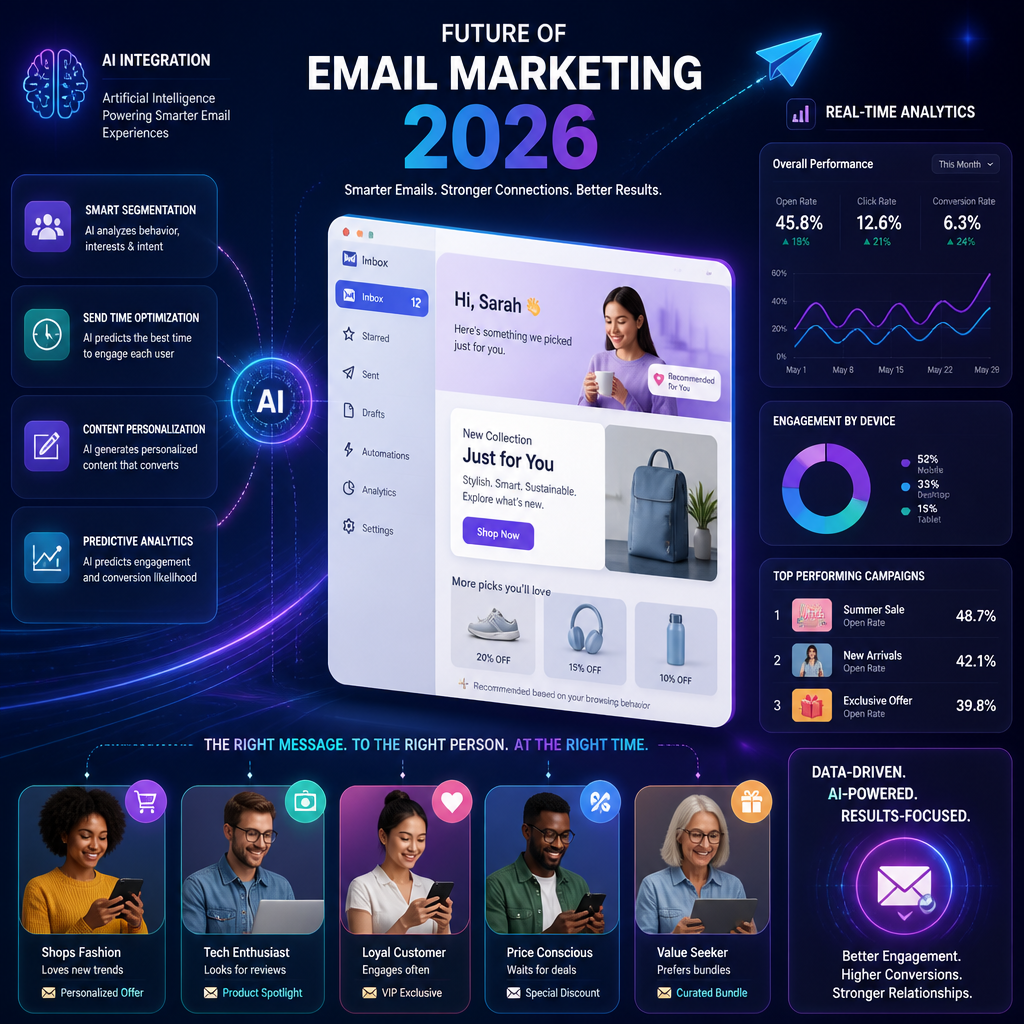
    Futuristic email marketing scene showcasing advanced technology

    Futuristic email marketing scene showcasing advanced technology

    Introduction to Email Marketing Trends

    Email marketing trends for 2026 aren’t about chasing shiny tactics. They’re about doing the fundamentals at a higher level because inboxes are crowded and patience is low.

    Here’s the real shift I’m watching: your “average” email program won’t survive on averages anymore. Average open rates. Average click rates. Average segmentation (aka none). Average design (heavy images, slow load, tiny text). If you’re competing with brands that tailor content, send based on behavior, and test like they mean it, you’ll feel it.

    A quick QA-flavored story: I once tested a “simple” promotional campaign where the marketing team swore the segmentation was correct—VIP customers would get early access, everyone else would get general access. In staging it looked fine. In production, a single boolean field was inverted (classic), and we gave general subscribers the VIP offer first. Cue: angry emails from actual VIPs, support tickets, and a rushed follow-up that performed even worse. That wasn’t a “creative” failure. It was a systems + process failure.

    So when I talk about trends, I’m going to keep coming back to:

    • Data discipline (because personalization and automation are only as good as the inputs)
    • Real testing (not “send yourself a test email and glance at it on iPhone”)
    • Consent and trust (because over-personalization can backfire fast)

    Step-by-step: how I’d “trend-proof” an email program in 30 days

    If I were dropped into a small team today and told to prep for 2026, I’d do this in order:

    1. Audit list sources + consent: where subscribers came from, what they agreed to, and whether you can prove it.
    2. Fix the top 10 template breakpoints: Gmail mobile, iOS Mail, Outlook desktop (yes, still), dark mode.
    3. Define 5–8 core segments: new subscribers, active buyers, lapsed buyers, high AOV, category interest, etc.
    4. Stand up 3 automations that pay for themselves: welcome, abandonment/browse, post-purchase.
    5. Add measurement that answers business questions: revenue per email, revenue per subscriber, and churn/unsub by campaign type.

    If you do only that, you’re already aligned with the biggest trends—because most “future” email wins are just better execution of the boring stuff.

    The Rise of Personalization in Email Marketing

    Personalization is the trend everyone talks about, and in 2026 it’ll be the baseline—not the differentiator.

    The proof point marketers love is still true: according to the State of Personalization Report by Twilio, emails with personalized subject lines are 26% more likely to be opened compared to those without. But subject lines are the smallest part of the story.

    What’s changing is what people consider “creepy” vs “helpful.” “Hey Mariaa, we saw you looking at red sneakers at 2:14 AM” is… a lot. “Still looking for running shoes? Here are the models that fit your size and budget” feels useful.

    What personalization that actually works looks like

    In practice, the best-performing personalization I’ve seen is built on a few predictable inputs:

    • Lifecycle stage (new subscriber vs repeat buyer vs churn-risk)
    • Behavior (browse, add-to-cart, category clicks, time since last purchase)
    • Preference (explicit choices beat inferred guesses)
    • Context (seasonality, location, inventory, pricing)

    Brands like Amazon and Spotify are the obvious examples because they have the data and the muscle. Amazon’s recommendations are basically a product merchandising machine disguised as “helpful suggestions.” Spotify’s “Wrapped” style experiences and taste-based recommendations keep engagement high because they reflect the user back to themselves.

    My take: AI and machine learning will keep pushing this forward, but the winners won’t be the brands with the fanciest models—they’ll be the ones with the cleanest data and the best restraint.

    Step-by-step: a safe personalization ladder (so you don’t faceplant)

    If your team is early, climb in levels:

    1. Level 1 — Identity: first name (only if you know the field isn’t garbage), location/timezone.
    2. Level 2 — Behavior blocks: “Because you bought X,” “Because you read Y,” “Recommended for you.”
    3. Level 3 — Dynamic offers: category-specific discounts, bundles, replenishment reminders.
    4. Level 4 — Predictive timing: send-time optimization, frequency caps per user.
    5. Level 5 — Journey branching: content changes based on actions inside the sequence.

    You’ll notice I didn’t mention “hyper-personalized everything.” That’s because most teams don’t have the instrumentation to validate it.

    Common mistakes I keep seeing (and how to avoid them)

    • Bad merge fields: “Hi ,” or “Hi FNAME.” It screams amateur hour. In QA I always insist on fallbacks (e.g., “Hi there,”).
    • Over-segmentation: 40 tiny segments that never get enough volume to learn anything.
    • Personalization without consent: you can comply with the law and still feel invasive. Watch unsubscribes and spam complaints when you add new data-driven blocks.
    • Stale recommendations: showing out-of-stock products or stuff the customer already returned. That’s a trust killer.

    The 2026 version of personalization is less about impressing people and more about quiet relevance—the email feels like it belongs in their inbox.

    Email Automation: Efficiency and Effectiveness

    Automation in 2026 isn’t optional—manual sending doesn’t scale, and it’s too slow to react to behavior.

    The business case is clear: according to data from HubSpot, businesses that automate their marketing see conversion rates increase by over 50% on average. I don’t treat that as a promise, but I do treat it as a sign that most manual programs are leaving money on the table.

    The automations that tend to matter most

    You already listed the classics, and yes, they still dominate:

    • Welcome sequences
    • Cart abandonment emails
    • Re-engagement campaigns

    But in 2026, the teams doing well are adding a few more “unsexy” automations:

    • Post-purchase education (reduces refunds, increases repeat purchases)
    • Back-in-stock + price-drop alerts (high intent, low effort)
    • Review/NPS requests timed to product delivery (timing beats copy)

    Platforms like Mailchimp and Klaviyo make this easier than it used to be. The hard part is not clicking around in the automation builder—it’s deciding the rules and making sure they’re correct.

    A real example: the automation bug that tanked a week

    I’ve seen a cart abandonment flow that fired correctly… and then fired again every time the user revisited the cart, even after purchase. The trigger logic was “Cart Updated” instead of “Checkout Started,” and the exit condition was missing. People who already bought got “Your cart is waiting” emails for days. Unsubscribes spiked, support got hammered, and deliverability took a hit.

    That’s why I treat email automation like software. Because it is.

    Step-by-step: how I QA an automation before it hits production

    Here’s the checklist I use (lightweight, but it catches the big failures):

    1. Map the flow on paper first: triggers, delays, branches, exit rules.
    2. Create test profiles for each path (new buyer, repeat buyer, discount used, etc.).
    3. Validate entry conditions: what exact event starts the flow?
    4. Validate exit conditions: what removes someone immediately?
    5. Check frequency caps: what prevents stacking multiple flows?
    6. Test real rendering: Gmail + iOS + Outlook; dark mode.
    7. Verify tracking: UTM parameters, conversion events, revenue attribution.
    8. Run a 24–48 hour soft launch to a small segment.

    Common automation mistakes (they’re predictable)

    • No suppression logic (customers get promo emails inside onboarding)
    • No “cooldown” periods (people get three emails in one day from different flows)
    • Set-and-forget content (old pricing, expired offers)

    In 2026, automation winners will be the teams who treat flows as living products: reviewed monthly, measured, tweaked.

    Emerging Technologies Influencing Email Marketing

    “Emerging tech” can get hand-wavy fast, so I’m going to be picky. The stuff that will actually affect your email program by 2026 falls into a few buckets.

    AI + analytics: less guessing, more measurable relevance

    AI is already being used for:

    • Predicting what a subscriber is likely to buy next
    • Choosing the best time to send (per user)
    • Generating subject line variants
    • Clustering audiences based on behavior

    My bias: AI is best used as an assistant, not the driver. I’ve seen AI-written copy that reads fine but doesn’t match the brand voice, and it can quietly increase spam complaints because it feels generic.

    How I know: I’ve QA’d campaigns where the “AI subject line” beat the control on opens, then lost on clicks and revenue because it overpromised.

    Blockchain: potentially useful, but don’t plan your roadmap around it

    Blockchain comes up because trust and authenticity matter more every year. According to Forbes, blockchain can help verify the authenticity of emails, reducing fraud and improving trust among consumers.

    Do I think most marketing teams will be “doing blockchain email” in 2026? Probably not. But I do think the idea behind it—verifiable identity and reduced fraud—will keep shaping email standards and vendor tooling.

    Chatbots + email: tighter handoff between inbox and conversation

    The practical use case I see is this:

    • Email drives someone to an action (book, buy, ask a question)
    • A chatbot handles the first layer of support/sales
    • The email platform captures the outcome and adjusts the next message

    That loop—email → conversation → data → better email—is where the value is.

    Step-by-step: a simple “emerging tech” pilot that won’t derail you

    If you want to experiment without wrecking your calendar:

    1. Pick one flow (welcome or post-purchase is safest).
    2. Add one AI element (send-time optimization or product recommendations).
    3. Define success as revenue per recipient (not just opens).
    4. Run A/B for 2–4 weeks.
    5. Keep a manual override. Always.

    Common mistakes with new tech

    • Optimizing the wrong metric (open rate goes up, revenue goes down)
    • Adding complexity before data hygiene (garbage in, garbage out)
    • Trusting black-box outputs without sampling real user experiences

    By 2026, tech will matter—but execution and judgment will matter more.

    Trends in Email Content and Design

    Your 2026 email design trend is simple: it has to work on mobile, instantly, without drama.

    You mentioned a stat that I’ve seen reflected in real programs: over 70% of emails are opened on mobile devices. Even when desktop revenue is higher, mobile is where people decide if they’ll deal with you at all.

    What I expect to keep growing

    • Mobile-first layouts: single column, readable type, tappable buttons
    • Immersive content: short video snippets, GIFs (used carefully)
    • Bold typography and colors: not “loud,” just clear and scannable
    • Interactivity: polls, surveys, preference centers—anything that earns a click

    One caveat from the trenches: interactive elements can break in certain clients. That means you design it like progressive enhancement—nice-to-have, not required-to-function.

    A real example: the “beautiful” email that didn’t load

    I tested a holiday campaign once that looked like a landing page—big hero images, custom fonts, multiple product grids. On fast Wi‑Fi, it was gorgeous. On mobile data, it loaded in chunks and the CTA was below the fold for several seconds.

    Result: complaints like “your email is blank,” and the click rate was half of the plainer template.

    Design doesn’t get credit for being pretty. It gets credit for driving action.

    Best Practices for Designing Emails (the stuff I enforce)

    • Subject line + preheader as a pair: don’t waste the preheader on “View in browser.”
    • Tap targets: buttons should be easy to hit with a thumb.
    • Dark mode checks: especially for logos and text over images.
    • Alt text that’s not useless: describe the offer, not “image1.”
    • Keep weight reasonable: compress images; avoid huge GIFs.

    Step-by-step: my quick design QA pass (15 minutes)

    1. Open in Gmail app (Android or iOS): scanability, CTA visibility.
    2. Open in iOS Mail: dark mode, image scaling.
    3. Open in Outlook desktop: spacing, font fallbacks, table weirdness.
    4. Turn images off (where possible): does the email still make sense?
    5. Click every link: correct destination, correct UTM parameters.

    Common design mistakes in 2026-ready programs

    • Tiny text (especially in product grids)
    • CTA buttons too close together (fat-finger city)
    • One giant image (breaks, clips, and feels spammy)

    If you want one rule: design for the most impatient person on the oldest client you still care about.

    FAQ Section on Email Marketing Trends

    1. What are the major trends in email marketing for 2026?
      Personalization (done with restraint), automation with better suppression/frequency control, and smarter use of AI-driven analytics. Also: mobile-first design isn’t a trend anymore—it’s the minimum.

    2. How will personalization impact email marketing in 2026?
      Personalization will raise the bar for relevance. Per Twilio’s report, personalized subject lines are 26% more likely to be opened (State of Personalization Report by Twilio). The bigger impact comes from personalized content blocks and lifecycle-based journeys.

    3. What role does automation play in email marketing strategies?
      Automation runs the money flows (welcome, abandonment, post-purchase) and prevents teams from relying on manual blasts. HubSpot reports businesses that automate marketing see conversion rates increase by over 50% on average (HubSpot).

    4. What technologies will shape the future of email marketing?
      AI/ML for recommendations and timing, better analytics, and improved identity/trust approaches. On the trust side, Forbes notes blockchain’s potential to verify email authenticity and reduce fraud.

    5. How can businesses prepare for the future of email marketing?
      Start with fundamentals: clean segmentation, reliable automations, mobile-first templates, and a testing process. Then pilot one “new” capability at a time (send-time optimization or recommendations), and measure revenue—not vanity metrics.

    6. Are there any risks associated with email marketing in the future?
      Yes: privacy backlash, consent issues, and deliverability damage from over-sending or broken automations. A lot of risk comes from moving fast without QA—wrong segments, missing suppression, and stale dynamic content.

    Conclusion and Key Takeaways

    By 2026, the email programs that win won’t be the loudest. They’ll be the most controlled.

    • Personalization will be expected, but it has to feel helpful—not invasive—and it must be backed by clean data.
    • Automation will keep compounding results, but only if you build it with real triggers, exit rules, and frequency caps.
    • Emerging tech (AI especially) will help, but it won’t save a messy program. Use it as a multiplier on good fundamentals.
    • Content and design will be judged on speed, clarity, and mobile usability—not aesthetics.

    If you want a practical next step, pick one section and operationalize it this week: build (or fix) your welcome sequence, add two meaningful segments, or do a full QA pass on your highest-traffic automation.

    And if you’re collecting resources for what to watch next, keep these handy: The Future of Email Marketing: Key Trends to Watch in 2026 and (oddly useful for thinking about attention + devices) Smartwatch Features for 2026.

  • Smartwatch Features for 2026

    Explore the innovative features of smartwatches in 2026 that will redefine technology. Learn about health monitoring, AI integration, and more.

    Top features of smartwatches in 2026

    Top features of smartwatches in 2026

    1. Advanced Health Monitoring (the jump from “metrics” to “meaning”)

    Advanced health monitoring is the headline feature for a reason: it’s the first area where a watch can pay for itself without you changing your personality.

    In 2026, the best devices won’t just collect more data (heart rate, blood pressure, blood oxygen, sleep stages). They’ll get better at making that data usable—in context, over time, with fewer false alarms.

    Here’s what I mean by “usable,” based on what I’ve tested and debugged in wearables over the years:

    • Cleaner baselines: Your watch should learn what “normal” looks like for you (resting HR on weekdays vs weekends, sleep debt patterns, what happens after alcohol, how travel affects recovery). The raw number matters less than the trend.
    • Confidence and caveats: Health insights need a “confidence meter” (or equivalent) because wrist-based sensing is noisy. Tattoos, skin tone, motion, fit, sweat, cold weather—these all impact optical sensors.
    • Actionable nudges: A watch that says “your HRV is low” is trivia. A watch that says “your HRV is low and your sleep was short and your training load is high—take a lighter day” is guidance.

    A concrete example from my own life: I once wore a watch too loose during a week of treadmill runs. The watch flagged “irregular heart rate” twice. Scary notification, zero context. When I tightened the band (two notches) and re-ran the same routine, the “anomaly” disappeared. That wasn’t a heart problem—it was a fit problem. In QA terms, it was a sensor contact issue masquerading as a health event.

    Step-by-step: how I set up health monitoring so it’s not garbage data

    1. Fit first, features second: snug enough that the sensor doesn’t slide during movement, not so tight it leaves marks.
    2. Calibrate during boring days: wear it for 7–14 days before believing any “insight.” Baselines need normal life, not a new gym kick.
    3. Pick 2–3 metrics that matter: most people drown in dashboards. I usually stick to resting HR, sleep consistency, and one recovery metric (like HRV).
    4. Turn on only the alerts you’ll act on: if you won’t do anything about a warning, it becomes noise.

    Common mistakes I keep seeing

    • Treating wrist data like medical-grade diagnostics. It’s trending and screening, not a doctor.
    • Chasing perfect sleep scores. People game the score instead of improving sleep habits.
    • Ignoring sensor limitations. If you’re lifting, cycling on rough roads, or wearing it over a tattoo, expect more jitter.

    One market signal that matches what I’m seeing in product roadmaps: the global health monitoring smartwatch market is projected to grow from USD 20,050 million in 2024 to an estimated USD 43,926 million by 2032, driven by demand for continuous tracking (Credence Research). That doesn’t happen unless people keep finding day-to-day value.

    2. AI Integration for Smart Assistance (useful if it’s humble, awful if it’s noisy)

    AI in a smartwatch is either a quiet helper… or a confident little liar. I’m rooting for the first one.

    In 2026, AI integration should show up in three practical places:

    1. Predictive health monitoring: not “you might get sick someday,” but “your resting HR is elevated, your sleep duration dropped, and your recovery trend is down—consider a lighter training day.”
    2. Micro-coaching that respects your calendar: suggestions that factor in your actual schedule and energy, not generic advice.
    3. Hands-busy assistance: short, voice-first interactions that save you phone time (timers, quick replies, reminders, “start a workout,” “text I’m running 10 minutes late”).

    A real scenario I’ve seen go wrong (and how it should work)

    A friend enabled an “AI coach” mode on their watch. Within 48 hours, it had nagged them to stand, to breathe, to hit a step goal, to drink water, and to do a workout—on the day they had a fever.

    That’s the failure mode: AI that doesn’t know when to shut up.

    The better version in 2026 is contextual humility:

    • If you’re sedentary but your calendar says “3-hour flight,” don’t scold—suggest stretches when you land.
    • If sleep is low and your training load is high, suggest a short walk instead of HIIT.
    • If you ignore a suggestion three times, it should back off automatically.

    Step-by-step: how to make AI assistance actually helpful

    • Start with one lane: health coaching or productivity help. Don’t turn on everything at once.
    • Set hard boundaries: quiet hours, focus modes, and do-not-disturb rules.
    • Review its “why”: if the watch can’t explain why it’s recommending something (even briefly), I don’t trust it.

    This isn’t a niche direction, either. The wearable AI market is projected to reach USD 138.50 billion by 2029 (MarketsandMarkets). The money is flowing because the winners will feel like time savers, not toy features.

    3. Seamless Smart Home Integration (the wrist becomes the fastest remote you own)

    Smart home integration sounds like a gimmick until you live with it. Then you get used to controlling your environment without hunting for a phone, opening an app, waiting for it to load, and navigating three screens.

    In 2026, the best smartwatch-smart home setups will feel less like “integration” and more like shortcuts you can trust:

    • One tap to trigger a “Leaving” scene (lights off, thermostat adjust, doors lock).
    • A quick glance confirming your garage is closed.
    • Silent alerts for doorbell motion while you’re on a call.

    Mini story: where this is genuinely clutch

    I tested a setup where security alerts went to my wrist while I was cooking (hands messy, phone across the room). Motion detected at the front door. On my watch, I could see the alert, silence it, and turn on exterior lights immediately.

    That’s the kind of moment where a watch beats a phone—because the watch is already on you.

    Step-by-step: how I’d set it up (without turning your house into a circus)

    1. Pick two “scenes” max to start: “Good Night” and “Leaving” are the highest ROI.
    2. Choose your critical devices: locks, lights, garage, and thermostat. Skip the novelty stuff at first.
    3. Route alerts intentionally: doorbell + alarm events go to the watch; routine device status stays in the app.
    4. Test failure states: what happens when Wi‑Fi drops? what if the watch is offline? I always want a manual fallback.

    Common mistakes

    • Over-integrating too early: people connect 25 devices, then spend weekends debugging automations.
    • Alert fatigue: every camera ping becomes a wrist buzz—then you ignore the one that matters.
    • No security hygiene: weak passwords and shared accounts. If your watch can unlock your home, treat it like a key.

    Also, smart home adoption is not slowing down. By 2024, there will be approximately 478.2 million smart device-equipped homes globally (Strategic Market Research). That’s the ecosystem smartwatches are plugging into.

    4. Personalized and Customizable Interfaces (because default settings are always wrong)

    Here’s my spicy QA take: most smartwatch “reviews” are done with default settings, and that’s basically reviewing the wrong product.

    The best smartwatch interface is the one you barely notice. You shouldn’t be digging for what you need. You should be glancing, tapping once, and moving on.

    In 2026, personalization should go beyond “pick a watch face.” It should mean:

    • Modular widgets that match your day (workday vs weekend vs travel).
    • Per-app notification rules (not just on/off, but priority, grouping, and timing).
    • Adaptive layouts based on what you use (surfacing your top two actions at the top).

    A practical setup I recommend (and why)

    I keep three interface “modes” in my head when I configure a watch:

    1. Work mode: calendar next, messages from VIPs only, timers, authentication prompts (if you use them).
    2. Training mode: workout shortcut, music controls, heart rate, lap button that’s easy to hit while moving.
    3. Recovery mode: sleep widget, stress/recovery trend, hydration reminder (if you like those).

    If your watch can’t quickly shift between those without you babysitting it, the UI isn’t personalized—it’s just skinned.

    Common mistakes

    • Too much info on the face: looks impressive, reads terribly. In sunlight, in motion, under stress—simplicity wins.
    • Using the same layout for every context: meetings and workouts need different surfaces.
    • Ignoring accessibility settings: larger text, haptics, and contrast aren’t “nice to have” if you actually rely on the device.

    5. Real-Time Notification Management (the feature that decides whether you love or hate your watch)

    Real-time notification management is the make-or-break. If your watch is a buzzing panic bracelet, you’ll abandon it. If it filters the world so only the right stuff gets through, you’ll wear it for years.

    In 2026, I expect the smarter models to be context-aware in ways that are finally practical:

    • If you’re in a meeting (calendar says so), notifications get bundled and delivered silently.
    • If you’re navigating, your wrist gets route nudges, not random social pings.
    • If you’re mid-workout, only urgent calls break through.

    Step-by-step: my notification rules (stolen from painful experience)

    1. Start from zero: disable everything.
    2. Add back only what you’d want during a run or a meeting: calls, texts from favorites, calendar reminders, authenticator prompts.
    3. Bundle the rest: delivery windows (e.g., lunchtime, end of day) if your watch supports it.
    4. Use different haptics: one pattern for “urgent,” another for “FYI.”
    5. Review weekly for five minutes: if you swiped away 90% of alerts, you’re doing it wrong.

    A real mistake I’ve watched people repeat

    They keep every app’s notifications on “because I might need it.” Two days later they’re getting: shipping updates, social likes, news, game streaks, and promo emails—on the wrist.

    Then they say, “Smartwatches are distracting.”

    No. Misconfigured smartwatches are distracting.

    The best notification system is a bouncer, not a megaphone.

    My Journey in Technology (why I care about the boring details)

    I’m Mariaa, and I’ve lived in the QA world long enough to know the gap between “works in a demo” and “works on a Tuesday.” Wearables sit right in that gap.

    One of the most common wearable bugs I’ve had to reproduce is the one users describe as: “It’s inaccurate sometimes.” That’s not a bug report—it’s a mystery novel.

    So I started treating watches like any other product under test:

    • I track conditions: tightness, wrist placement, skin temperature, workout type.
    • I compare against reality: did I actually sleep poorly, or did the watch misread movement?
    • I look for pattern breaks: does accuracy drop only during interval training? only outdoors? only after a firmware update?

    A small but telling example: I once updated a watch firmware the night before a long run (classic mistake). Next morning, GPS took forever to lock, and my pace data was trash for the first mile. Was it the update? the weather? a satellite lock issue? Hard to prove—but easy to avoid. Now I update wearables when I’m not depending on them the next day.

    That’s the mindset I’m bringing to 2026 features: I’m excited, but I’m also watching for the messy edges—battery tradeoffs, permissions, false positives, and UI complexity.

    Conclusion (what I’d do if you’re buying or upgrading in 2026)

    If you’re looking at smartwatches in 2026, I’d ignore the marketing and ask one question: Will this device reduce friction in my life, or add another stream of noise?

    Advanced health monitoring, AI assistance, smart home control, personalization, and real-time notification management can absolutely change the game—but only when they’re tuned to your routines, not the manufacturer’s defaults.

    My advice is simple and slightly annoying: buy for the features you’ll configure, not the features you’ll brag about. Then spend one deliberate hour setting it up.

    Frequently Asked Questions

    What are smartwatches?

    Smartwatches are wearable devices that connect with smartphones (and increasingly work more independently) to provide features like health monitoring, activity tracking, and notifications.

    How will smartwatches change in 2026?

    They’ll lean harder into proactive health insights, AI-driven assistance, tighter smart home controls, deeper personalization, and smarter notification filtering—less “phone on your wrist,” more “wrist-based copilot.”

    What health features will be available on smartwatches?

    Expect more continuous tracking (heart rate, blood oxygen levels, and other sensor-derived signals) plus better trend analysis and personalized recommendations based on your baseline.

    Can smartwatches replace smartphones?

    For some tasks—timers, quick replies, authentication prompts, basic navigation—they can reduce phone dependence. For deep work (writing, managing files, long calls), they’ll still supplement rather than replace.

    What is the importance of AI in smartwatches?

    AI is what turns raw streams of data into prioritized suggestions—ideally with context and restraint—so the watch helps you decide, not just measure.

    Are smartwatches suitable for everyone?

    They’re great for people who want lightweight coaching, quick access to key alerts, or better awareness of routines. They’re less great if you don’t want another device to manage—unless you’re willing to aggressively control notifications.

  • Explore Future of DevOps Tools and Technologies

    Uncover the key DevOps tools and technologies to adopt in 2026 for enhanced collaboration and efficiency.

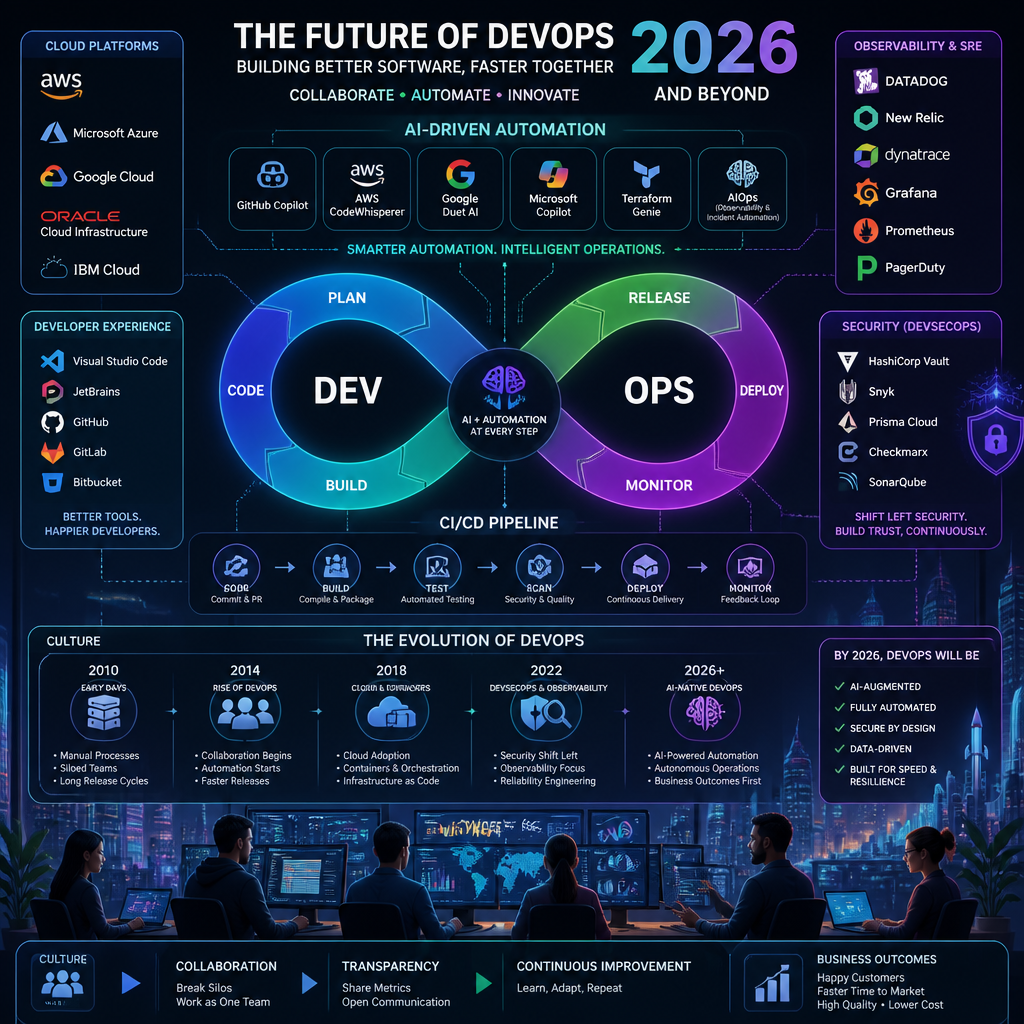
    Futuristic illustration of DevOps tools and technologies

    Futuristic illustration of DevOps tools and technologies

    Understanding the Future of DevOps

    The future of DevOps is less about a shiny new CI server and more about closing the loop: code → build → deploy → observe → learn → improve, with fewer humans doing repetitive glue work.

    Here’s the pressure that’s forcing the change:

    • More complexity per release. Microservices, event-driven architectures, and third‑party APIs mean one feature can touch 10 systems.
    • More releases per week. When you deploy daily (or hourly), manual checklists stop working.
    • More compliance and security expectations. Security reviews are getting pulled left into PRs and pipelines—whether you like it or not.

    And the money is clearly following that reality. The DevOps Automation Tools Market is expected to grow from USD 8.635 billion in 2024 to approximately USD 55.907 billion by 2032, at a CAGR of 26.3% (Credence Research). That doesn’t happen because vendors got better at marketing. It happens because automation is now a survival skill.

    The Evolving DevOps Roadmap

    A DevOps roadmap is only useful if it prevents two common failure modes:

    1. Tool sprawl (every team picks their own stack, and nobody can support it).
    2. Automation theater (pipelines exist, but they’re slow, flaky, and bypassed when it matters).

    If I’m building a roadmap for 2026, I’m anchoring it on a handful of capability areas, not brands:

    1. AI and Automation

      • AI isn’t magic. But it is good at speeding up the annoying parts: summarizing incident timelines, suggesting test cases, spotting risky diffs, and triaging alerts.
      • The goal is fewer human cycles spent on repeatable steps—linting, dependency updates, environment provisioning, and compliance evidence collection.
    2. Cloud-Native Tools

      • Cloud-native isn’t “we run in the cloud.” It’s designing around managed services, immutable infra, and automation-first operations.
      • This is also where platform engineering shows up: paved roads, shared templates, and opinionated defaults.
    3. Continuous Integration and Delivery (CI/CD)

      • CI/CD is still the backbone. What changes by 2026 is the expectation: pipelines should be fast, deterministic, and observable.
      • If your pipeline can’t explain why it failed (or how to reproduce it locally), it’s not a pipeline—it’s a slot machine.

    A lot of teams are already prioritizing automation and AI integration. You can see that direction reflected in the DORA 2024 report, which lines up with what I’m seeing in real orgs: the winners are the ones reducing toil and tightening feedback loops.

    A real example I’ve seen: a mid-size SaaS team tried to “modernize DevOps” by adopting Kubernetes, a service mesh, two different CI tools (because two teams disagreed), and an experimental GitOps controller—all in one quarter. They shipped less, not more. The fix wasn’t another tool. It was picking a single delivery path, enforcing standards via templates, and making observability non-negotiable before scaling complexity.

    Key Tools and Technologies for 2026

    This is the part where most articles list 30 logos. I’m not doing that. In practice, you’ll pick a small set of tools—but you need the right categories covered, with sane boundaries.

    AI-Driven Automation Software

    AI-driven automation will be a big piece of DevOps in 2026, but only if you treat it like an assistant, not a pilot.

    Where it actually helps in the real world:

    • PR assistance: flagging risky changes (like config edits, auth changes, or high‑churn files).
    • Test generation suggestions: especially for edge cases people forget.
    • Incident response: summarizing alert storms into likely root causes and correlating deploys with error spikes.
    • ChatOps workflows: “deploy service X to staging with version Y” becomes a controlled action, not tribal knowledge.

    There’s some evidence that AI assistance can improve delivery outcomes. For instance, organizations using AI-assisted development practices reported decreases in deployment times and reductions in operational errors (WJARR).

    Common mistake: letting AI touch production changes without guardrails. If you adopt AI code assistants, pair it with:

    • mandatory code review for high-risk areas
    • policy checks (IaC scanning, secret detection)
    • protected branches and signed commits/tags
    • deployment approvals based on risk (not based on someone’s job title)

    Enhanced Monitoring Solutions (Observability That’s Actually Usable)

    By 2026, “monitoring” that only tells you CPU and memory is table stakes. You’ll want:

    • traces that follow a request across services
    • logs that are structured and searchable (not just big text blobs)
    • metrics that match user experience (latency, error rate, saturation)
    • SLOs that define what “good” means

    Proactive monitoring matters because the cost curve is ugly: the longer an incident runs, the more it eats engineering time and customer trust.

    Mini story: I once watched a team drown in alerts because every pod restart paged someone. The real signal—checkout latency—was buried. We fixed it by (1) defining SLOs, (2) paging only on user-impacting symptoms, and (3) moving noisy infrastructure alerts to dashboards and daily reviews. Same tools, radically different outcomes.

    Integrated Development Environments (IDEs) with DevOps Capabilities

    IDEs are turning into “delivery consoles.” The upside is speed: developers can run tests, validate pipelines, and trigger deployments without context switching.

    The downside is governance. If every developer can deploy from their IDE with one click, you’d better have:

    • environment protections
    • audit trails
    • consistent pipeline steps (so “it worked on my machine” doesn’t become “it bypassed CI”)

    What I like: IDEs that surface pipeline failures with actionable hints, link directly to logs/traces, and let you reproduce CI steps locally (same container image, same command).

    Cloud-Native Delivery: Containers, GitOps, and Policy as Code

    This is where 2026 gets practical:

    • Containers are still the unit of deployment for many teams.
    • GitOps patterns keep desired state in Git and let automation reconcile environments.
    • Policy as code (for infra, security, and compliance) reduces “handshake” approvals that slow teams down.

    Tradeoff: GitOps adds safety and repeatability, but it can also add latency if you don’t tune reconciliation, promotion workflows, and drift handling. It’s not free. It’s worth it when you care about auditability and consistency.

    How to Prepare for the Future of DevOps

    If you’re preparing for 2026, don’t start by buying tools. Start by tightening the system you already have.

    Here’s a step-by-step approach I’ve used that doesn’t create chaos.

    1) Research and Identify Tools (but start from pain)

    Do this in a week, not a quarter.

    • List your top 5 sources of delivery pain: flaky tests, slow builds, manual approvals, unclear ownership, incident handoffs.
    • Map each pain to a capability: caching, test selection, policy checks, deployment automation, better observability.
    • Only then evaluate tools.

    Common mistake: adopting a tool because a competitor uses it. Different orgs have different constraints—regulated environments, latency needs, team maturity.

    2) Evaluate Current Practices (baseline your reality)

    Before you “improve DORA metrics,” measure what’s happening now.

    • How long does CI take on an average PR?
    • How often are deploys rolled back?
    • How long does it take to detect and mitigate incidents?
    • How many manual steps exist between merge and production?

    If you can’t answer these without a spreadsheet and a prayer, that’s your first project: instrument the pipeline.

    3) Implementation Planning (make it boring)

    I like to roll changes out in three rings:

    • Ring 0 (sandbox): one service, one team, low risk.
    • Ring 1 (staging defaults): templates and golden paths.
    • Ring 2 (production standards): enforce policies, remove bypasses.

    And I insist on two deliverables for any new tool:

    1. A rollback plan (not “we’ll figure it out”).
    2. A runbook for the team that will get paged when it breaks.

    4) Continuous Feedback Loop (keep score)

    Set a monthly review with engineering + ops + security.

    • Look at build times, deploy frequency, change failure rate, MTTR.
    • Review top recurring pipeline failures.
    • Kill one piece of toil per month (a manual approval, a flaky test suite, a brittle script).

    Persona anecdote: one org I worked with had a “continuous improvement” meeting that was just venting. We fixed it by requiring each complaint to come with (a) one data point and (b) one proposed experiment limited to two weeks. Morale improved because people saw problems actually get removed.

    Misconceptions About DevOps

    Misconception 1: DevOps is just about tools

    Tools help, but DevOps fails more often due to incentives and ownership than due to missing software.

    If dev owns “features” and ops owns “uptime,” you’re going to fight. The 2026 version of DevOps pushes toward shared responsibility, clearer SLOs, and fewer handoffs.

    A mistake I see constantly: “We implemented DevOps” means “We bought a CI tool.” Then incidents happen, and nobody owns the deployment pipeline because it sits between teams. Fix: assign a pipeline owner (or platform team), define SLAs for the pipeline itself, and treat it like production.

    Misconception 2: AI will replace DevOps engineers

    AI will replace some tasks, not the job.

    It’s great at suggestions. It’s not great at accountability. When a deploy corrupts data, you need someone who understands blast radius, rollback strategies, and which metrics prove recovery.

    If you want AI to be safe in DevOps, treat it like a junior engineer: useful, fast, occasionally wrong, and always supervised.

    Misconception 3: Kubernetes (or any platform) automatically makes you “modern”

    Kubernetes can be the right move. It can also be an expensive detour.

    If your current pain is slow reviews and manual testing, Kubernetes won’t help. If your pain is inconsistent environments and scaling lots of services, it might.

    The rule I use: don’t add platform complexity until your delivery process is already repeatable.

    FAQ

    What are the key tools in the DevOps roadmap for 2026?

    The key “tools” are really tool classes:

    • AI-assisted automation (PR risk checks, incident summarization)
    • CI/CD platforms that support fast, cache-friendly pipelines and policy gates
    • observability tooling (metrics + logs + traces) tied to SLOs
    • GitOps/policy-as-code patterns for repeatable environments

    If you pick one thing to standardize first, make it the delivery pipeline templates. Tool choice matters less than consistency.

    How will DevOps evolve by 2026?

    Expect DevOps to move further toward:

    • more automation for provisioning, testing, and compliance evidence
    • more AI assistance in triage and code review
    • more platform engineering (internal “paved roads”)
    • stronger expectations around reliability metrics and SLOs

    The teams that win will be the ones that make safe changes easy—and unsafe changes hard.

    Why is a DevOps roadmap important?

    Because without a roadmap, you’ll do what most orgs do: adopt tools opportunistically, then spend the next year integrating and supporting them.

    A decent roadmap forces hard decisions:

    • Which deployment path is the standard?
    • What’s the minimum bar for observability?
    • Where are approvals required—and where are they replaced by policy checks?

    It also gives you a way to say “no” to random requests that don’t fit.

    What technologies should we start adopting now for DevOps?

    Start with what reduces risk quickly:

    1. Pipeline as code (versioned, reviewable)
    2. Containerization where it makes deployments consistent (Docker is fine)
    3. Secret scanning and dependency automation
    4. Basic tracing + structured logging for critical services

    Then expand into GitOps or policy-as-code once your fundamentals aren’t on fire.

    Is DevOps only for large companies?

    No. Smaller teams often get the biggest benefit because a little automation saves a lot of time.

    The trick for small orgs: avoid overbuilding. You don’t need a complex platform team to get value. You need:

    • a clean CI pipeline
    • scripted environments
    • sane monitoring
    • a lightweight on-call and incident routine

    How can I stay updated with DevOps trends?

    Skip the trend-chasing and watch what practitioners measure.

    • Read reports like the DORA 2024 report
    • Follow release notes for the tools you already run (that’s where real change lands)
    • Join a couple of practitioner communities and compare notes on what broke in production, not what demoed well

    If you do one thing this week: pick one painful, manual step in your pipeline and delete it—properly, with tests and a rollback plan.

  • Leverage AI for Personalized Email Marketing

    Discover how to create AI-driven personalized email marketing campaigns that drive engagement and revenue in 2026.

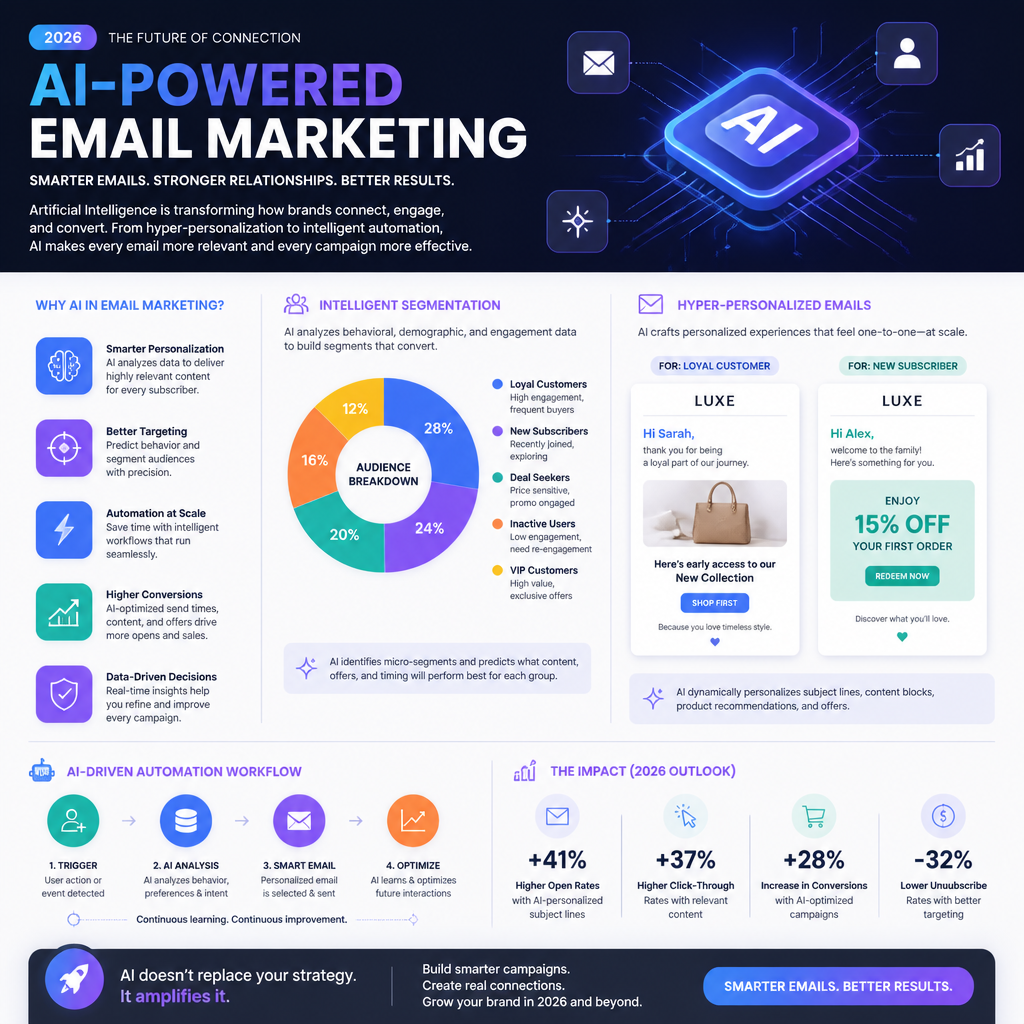
    Infographic showing AI in Email Marketing Strategies

    Infographic showing AI in Email Marketing Strategies

    Understanding AI and Its Role in Email Marketing

    AI in email marketing is mostly about pattern recognition at scale—not magic copywriting robots. In practice, you’re using machine learning models (either built into your ESP/CRM or layered on top) to do four jobs:

    1. Predict what someone is likely to do next (open, click, purchase, churn).
    2. Classify people into segments that actually behave differently.
    3. Recommend content (products, articles, offers) that fits their observed intent.
    4. Optimize timing/frequency so you’re not hammering inboxes.

    Here’s the part people skip: AI only works as well as your inputs. In QA terms, garbage in → confident garbage out.

    What “AI-powered personalization” looks like in real life

    A good AI-driven program usually relies on a small set of reliable signals:

    • Engagement signals: opens/clicks (yes, opens are messy now), site sessions, time on page, scroll depth.
    • Commerce signals: last purchase date, product categories purchased, AOV, returns.
    • Lifecycle signals: new subscriber, active buyer, lapsing, churned.
    • Stated preferences: quiz answers, email preference center selections.

    And then you apply those signals in ways that don’t overcomplicate the system.

    A real example (and why it matters)

    Coca-Cola is often cited for using AI insights to drive personalization in campaigns. The “Share a Coke” personalization angle is a clear example of using customer preference signals and feedback loops to shape what people see and buy (Mosaikx case study). The lesson I take from it: personalization works best when it’s simple, visible, and tied to emotion—not when it’s a thousand micro-segments no one can explain.

    Step-by-step: the minimum AI literacy you need (so you don’t get sold nonsense)

    You don’t need to become a data scientist. You do need to be able to ask better questions.

    1. Ask what the model is optimizing for. Opens? Clicks? Revenue? Retention? If it’s optimizing for opens, expect more clickbait subject lines.
    2. Ask what inputs it uses. If it’s mostly using opens, you’re building on a shaky signal.
    3. Ask how it handles new subscribers. Cold-start problems are real—good systems fall back to contextual and preference-based rules.
    4. Ask how you can override it. Brand risk is a thing; you want guardrails.

    Common mistakes I keep seeing

    • Mistake: Treating AI-generated copy as “done.” It’s draft material. Brand voice still needs a human editor.
    • Mistake: Letting the tool auto-segment everything. You’ll get segments that look smart but don’t map to real messaging. (My favorite example: a segment called “High intent value cluster 7.” Cool. What email do you send them?)
    • Mistake: Ignoring measurement drift. Your tracking changes, Apple Mail Privacy Protection changes your open rate reality, and suddenly the model “improves” for the wrong reasons.

    If you want a north star for 2026, it’s this: use AI to scale decisions, but keep the strategy human.

    Identify Your Target Audience with AI

    Segmentation is where AI actually earns its keep. Humans can create a handful of segments. AI can test dozens of behavioral patterns and find clusters you didn’t know existed.

    But I’m opinionated here: start with a few segments tied to business actions, then let AI refine within those. If you begin with 40 AI-generated micro-segments, you’ll never ship.

    The segmentation stack I use (boring, reliable)

    1. Lifecycle segment (rule-based): new lead, new customer, active customer, lapsing, churned.
    2. Intent segment (AI-assisted): browsing patterns, category affinity, likely next purchase category.
    3. Value segment (data-based): AOV, predicted LTV, discount sensitivity.

    A real example: Sephora and behavior-driven recommendations

    Sephora is a classic case of using behavioral data to improve recommendations and email performance—stronger targeting, better click-through, more revenue lift (ClickGiant case study). The takeaway isn’t “copy Sephora.” It’s: when segmentation is driven by what people actually do, your emails stop sounding like guesses.

    Step-by-step: build AI-assisted audience segments you can actually use

    Here’s a practical workflow that won’t drown your team:

    1. List your top 3 email goals. Example: reduce churn, increase repeat purchase, grow category cross-sell.
    2. Pick 5–10 events that matter. Viewed category page, added to cart, purchased, refunded, searched, clicked promo, etc.
    3. Define 3–5 “human-readable” segments first. Example: “Running gear browsers,” “Skincare replenishment,” “Discount-driven buyers.”
    4. Use AI to score and assign people to those segments. Not create new mystery segments—at least not yet.
    5. Validate segments with a spot check. QA-style: pull 20 random users from each segment and confirm the segment label makes sense.

    A mini story from the trenches

    I once tested an “AI segment” that supposedly represented “high-value repeat buyers.” When I pulled samples, half the people had only purchased once—because the model was overweighting recent clicks on premium products. The email team was about to send a VIP-only offer. That would’ve been a credibility disaster.

    Fix was simple: we added “purchase count ≥ 2” as a hard rule, then let AI sort within that group. AI got better, humans stayed in charge.

    Common segmentation mistakes

    • Over-trusting demographic data. Age and location matter less than behavior in most email programs.
    • Stale segments. If segments aren’t recalculated regularly (daily/weekly), your “lapsed” group includes people who bought yesterday.
    • No negative segments. You need exclusions: recent purchasers, refund-heavy customers, chronic non-openers.

    Creating Personalized Content with AI

    This is where people get excited—and where programs get weird fast.

    Personalized content should feel like:

    • “Oh, that’s useful.”
      Not:
    • “Why are you watching me?”

    AI helps you personalize what you say and how you say it, but you still need a structure. Otherwise you’ll generate infinite variants that don’t match brand voice, legal requirements, or even basic clarity.

    What I actually personalize (in order)

    1. Offer and product selection (highest impact)
    2. Proof and context (reviews, use cases, category-specific tips)
    3. Subject line + preheader (nice lift, but don’t obsess)
    4. Tone (only if your brand can support it)

    A real metric worth paying attention to

    Personalized email campaigns have been reported to increase revenue significantly—one commonly cited figure is up to 760% compared to generic campaigns (Humanic statistics). I’ve seen big lifts too, but only when personalization is tied to intent (category, replenishment, lifecycle). Random “personalization” widgets don’t do it.

    Step-by-step: build one email that personalizes 4 ways (without creating 4 separate emails)

    Let’s say you sell sporting goods. You want one promo email, but relevant to different behaviors.

    1. Create a single core message: “Gear up for spring training—new arrivals + 15% off.”
    2. Define 3 dynamic content blocks:
      • Block A: recommended products (based on last browsed category)
      • Block B: social proof (reviews from that category)
      • Block C: tips content (training tip relevant to category)
    3. Define fallback logic: if category affinity is unknown, show top sellers.
    4. Generate subject line variants with AI, then human-pick 2–3. Don’t run 20. You’ll dilute results.
    5. A/B test one thing at a time: subject line or offer or layout.

    Concrete example of “not creepy” personalization

    If someone browses running shoes, your email can say:

    • “New running shoes that hold up on long miles” (fine)
      Not:
    • “Still thinking about the size 9.5 Saucony Endorphin Pro you stared at for 7 minutes?” (too much, and it triggers privacy alarms).

    Common mistakes with AI content personalization

    • Mistake: Personalizing everything. If everything is dynamic, nothing is stable enough to measure.
    • Mistake: Forgetting accessibility and QA. Dynamic blocks break. Images fail. Merge fields show “Hi ,”. I’ve seen it go out to 400k people.
    • Mistake: Using AI copy that overpromises. Especially in regulated spaces (health, finance). AI loves confident claims.

    Automation and Optimization with AI-Driven Tools

    Automation is where AI quietly prints money—when it’s done with restraint.

    The highest ROI automations are usually:

    • Welcome series (first 7–14 days)
    • Browse abandonment
    • Cart abandonment
    • Post-purchase education + cross-sell
    • Replenishment reminders
    • Winback for lapsing customers

    AI improves these by choosing timing, selecting content, and throttling frequency so you don’t burn the list.

    Under Armour-style send-time optimization (and why it works)

    Send-time optimization is one of the least glamorous, most reliable AI wins. Under Armour used AI to optimize send times per user to improve opens and reduce unsubscribes (ClickGiant case study). I’ve seen similar patterns: when people get emails at the time they normally check mail, you’re not fighting the inbox.

    Step-by-step: set up AI-assisted automation without wrecking deliverability

    1. Start with one flow: cart abandonment is the classic.
    2. Set hard guardrails:
      • Max 1 abandon flow per 24 hours
      • Suppress if purchased
      • Suppress if they received 3+ emails in last 7 days (tune this)
    3. Use AI for one decision first: send-time optimization or product recommendation. Not both on day one.
    4. Define success metrics that matter: revenue per recipient, conversion rate, unsubscribe rate, complaint rate.
    5. Run a holdout test (if your platform supports it): keep 5–10% of users on the “old” logic so you can measure lift.

    The optimization loop I trust (weekly)

    • Pull performance by segment (not just overall).
    • Check for outliers: segments with high unsubscribes or low click-to-open.
    • Review AI decisions: did the system start pushing discounts to people who would’ve paid full price?
    • Adjust rules, then re-test.

    Common automation mistakes

    • Over-emailing your best customers. They engage, so the system feeds them more. Then they churn because you became noise.
    • No suppression logic for support issues. If someone has an open ticket or recent refund, pause promos. This is a real brand saver.
    • Letting AI optimize toward the wrong KPI. If it’s chasing opens, it’ll sacrifice trust.

    My Experience With This

    I’m Mariaa, and I’ve spent years in QA—so I’m allergic to “set it and forget it.” AI in email is powerful, but it’s also a fantastic way to scale mistakes.

    One project that sticks with me: an ecommerce brand came to us complaining that “AI personalization doesn’t work.” Their open rate looked okay, clicks were mediocre, revenue was flat. The AI tool got blamed.

    The real issues were painfully non-AI:

    • Their product catalog feed had inconsistent categories (“Sneakers,” “sneaker,” “sneakers/men”). Recommendations were a mess.
    • Their event tracking fired “Purchase” twice for some users. The system thought customers were buying more than they were.
    • Their suppression logic was missing, so frequent browsers got hammered.

    We fixed the inputs first. Then we re-launched personalization in a controlled way:

    What we did (the exact rollout)

    1. Week 1: cleaned catalog taxonomy + deduped purchase events.
    2. Week 2: rebuilt segments (lifecycle + category affinity) and validated with manual sampling.
    3. Week 3: launched one personalized module in one campaign (recommendations block only).
    4. Week 4: turned on send-time optimization for engaged subscribers only.

    Result: fewer complaints, better click distribution (less “everyone clicks one hero product”), and revenue finally moved. Not because AI got smarter overnight—because the system stopped lying to itself.

    My bias after doing this a while: boring foundations, tight guardrails, slow rollout, relentless measurement. It’s not sexy. It ships.

    FAQ

    What is AI in email marketing?
    AI in email marketing is the use of machine learning and predictive analytics to segment audiences, recommend content, optimize send times, and improve automation decisions based on behavior and outcomes.

    How can AI help personalize email content?
    It can infer intent from behavior (browsing, purchases, clicks), then tailor product picks, educational content, and messaging angles. It can also generate draft subject lines and variations—but I still treat those as drafts that need a human pass.

    Are there any risks with AI in email marketing?
    Yes. The big ones I’ve seen in production:

    • Privacy/creepiness (overly specific behavioral references)
    • Brand voice drift (AI copy that doesn’t sound like you)
    • Deliverability damage (too much automation, too little suppression)
    • Optimizing for the wrong KPI (opens instead of revenue or retention)

    How does audience segmentation work with AI?
    AI analyzes customer data—purchase history, browsing behaviors, engagement patterns—to group people into segments or score them for likelihood to take an action. The best setups combine AI scoring with human-readable segment definitions.

    What tools are recommended for AI email marketing?
    Mailchimp, HubSpot, and ActiveCampaign are common picks because they include AI-assisted features (segmentation, send-time optimization, automation). Tool choice matters less than whether your tracking, catalog data, and suppression rules are solid.

    What’s the future of AI in marketing?
    More hyper-personalization, yes—but also more pressure to be respectful: clearer consent, better preference centers, and smarter throttling so “personalized” doesn’t become “nonstop.” For more on where email is headed, read The Future of Email Marketing: Key Trends to Watch in 2026.

    One last practical next step

    Pick one email flow (welcome or cart abandon), add one AI capability (recommendations or send-time optimization), and measure lift with a holdout group. If you can’t measure it, you’re just decorating emails.

  • The Future of Email Marketing: Key Trends to Watch in 2026

    Explore the key trends in email marketing for 2026, focusing on AI, personalization, and data privacy.

    A futuristic email marketing concept featuring visuals of AI integration, personalized emails, and data analytics. The background includes elements like digital metrics, interactive email interfaces, and a representation of diverse email users. This image should convey innovation and advancement in email marketing for 2026.

    A futuristic email marketing concept featuring visuals of AI integration, personalized emails, and data analytics. The background includes elements like digital metrics, interactive email interfaces, and a representation of diverse email users. This image should convey innovation and advancement in email marketing for 2026.

    Understanding the Landscape of Email Marketing in 2026

    The landscape in 2026 looks “advanced” on the surface—AI copy, predictive send times, dynamic blocks—but the truth is email is still judged by the same ruthless metric it always was: does the recipient care enough to open, click, and act?

    Email marketing has evolved from one-size-fits-all newsletters into highly personalized, behavior-driven messaging. That shift happened because inboxes got crowded and consumers got picky. And because the tools got better. But tools don’t save you from bad strategy.

    A few realities I plan around when I’m QA-ing or advising on campaigns:

    • Reach is not the problem. As of 2026, there are about 4.8 billion email users worldwide, and that number is projected to grow. Email is still where your customers live.
    • Attention is the problem. Everyone is sending more emails. That means “pretty template + 10% off” is background noise.
    • Mobile and rendering are still quietly killing performance. If you haven’t run a template through real device + real client previews lately, you’re guessing.

    Litmus’s ROI number is a big part of why email stays on the shortlist even when budgets tighten: $36 for every $1 spent (Litmus). I’ve seen that play out most clearly when teams stop treating email as a broadcast channel and start treating it like a product experience—welcome flows, post-purchase education, replenishment reminders, winbacks.

    Current Email Engagement Statistics

    There’s a tension that shows up in most lists: people want to hear from brands… but not like that.

    One stat I come back to when shaping cadence and segmentation: 86% of consumers would like to receive promotional emails from companies they do business with at least monthly, and they prefer emails tailored to their interests (OptinMonster).

    What that means in practice:

    • Monthly promos are tolerated (even welcomed) if they’re relevant.
    • Generic promos become “why am I getting this?” real fast.

    A mistake I see constantly: teams interpret “send less” as the fix. Sometimes you should send less, sure. But more often, you should send smarter—split your list by intent signals (recent browse, last purchase category, lifecycle stage) and let those segments dictate content.

    A quick QA-flavored example: I once tested an ecommerce promo where the segmentation logic was “purchased in last 90 days.” Sounds fine—until you realize it scooped up people who bought a gift once, then never engaged again. The result: higher complaint rate, lower deliverability, and the “best customers” got the same email as everyone else. The fix wasn’t redesign. It was redefining segments (repeat buyers vs one-time, category affinity, and engagement recency).

    Key Trends in Email Marketing

    The trends that matter in 2026 aren’t shiny because they’re new. They matter because they solve real friction: relevance, speed, and trust.

    1. Rise of AI and Machine Learning

    AI is no longer a buzzword you toss into a deck. It’s operational.

    Used well, AI helps you:

    • Predict what a subscriber is likely to click based on past behavior
    • Personalize content blocks without building 40 manual segments
    • Optimize send time and frequency so you’re not over-mailing (or under-mailing)

    A case study from Done For You highlighted 25–122% higher open rates using AI in email campaigns.

    How I’d actually implement this (step-by-step):

    1. Start with one flow, not the whole program. Welcome series is the easiest place to measure lift because intent is high.
    2. Define one “AI decision.” Example: subject line variant selection, or product recommendations, not both.
    3. Lock your measurement window. Same list, same duration, same deliverability settings—otherwise you’ll attribute random noise to “AI.”
    4. QA the edge cases. Missing first name, empty recommendation set, suppressed categories, unsubscribed-but-still-triggered contacts.

    Common mistake: teams let AI generate copy and skip brand review. The output is often “fine,” but “fine” can still break brand voice, compliance rules, or just sound weirdly generic. I’ve seen AI confidently invent shipping promises and discount terms that weren’t real. That’s not a creative problem—it’s a legal and CX problem.

    2. Interactive and Multimedia Emails

    Interactive and multimedia content is climbing because it earns attention faster than text walls.

    One of the clearest stats here: emails containing video content can increase click-through rates by 300% (Wyzowl).

    That doesn’t mean you should stuff a video into every message. It means video is a high-leverage format when you have something visual to demonstrate—product walkthroughs, feature reveals, customer stories, onboarding.

    Real-world scenario I’ve watched play out:

    • Brand launches a new feature.
    • They send a long “here’s what’s new” email.
    • Support tickets spike because people still don’t get it.

    Swap in a short video thumbnail + one clear CTA (watch / try it), and suddenly the email does what it’s supposed to do: move the user forward.

    Common mistake: embedding video incorrectly. Many email clients don’t support true embedded video playback. The safer pattern is a clickable thumbnail (or GIF preview) that lands on a page where the video plays.

    3. The Importance of Data Privacy

    Privacy isn’t a checkbox anymore. It’s part of why people stay subscribed.

    Regulations like GDPR changed what “good” looks like, and consumer expectations keep tightening. If you’re vague about data use, people don’t debate it—they unsubscribe.

    Mailjet has a practical breakdown on GDPR and email marketing compliance (Mailjet). The big takeaway I care about: companies that respect privacy and consent build stronger relationships.

    What I push for (even when teams resist):

    • Clear preference centers (frequency + topics)
    • Double opt-in where list quality matters
    • Sunset policies for unengaged contacts (it helps deliverability and trust)

    Common mistake: hiding behind “legitimate interest” and blasting everyone forever. You might get away with it short term. Long term, your deliverability pays.

    The Impact of AI and Automation in Email Strategies

    AI and automation are changing email strategies because they turn “manual marketing work” into systems.

    The upside is obvious:

    • Automated flows respond instantly to behavior (browse, cart, purchase, churn signals)
    • Segmentation can be updated dynamically instead of via static exports
    • Performance insights can be surfaced faster than a weekly report cycle

    Brands using AI-driven solutions have reported ROI improvements exceeding 300% (Done For You).

    But here’s the part that doesn’t get said enough: automation amplifies whatever you already are. If your logic is sloppy, automation makes the sloppiness scale.

    A QA-ish mini story from the trenches:

    I once tested an automated post-purchase series where the “if delivered then send review request” condition was wired to the wrong event. Customers were asked for reviews before packages arrived. Not “eventually,” not “once.” Repeatedly, because the workflow didn’t have a guardrail.

    We fixed it by:

    1. Switching the trigger from “order fulfilled” to a delivery-confirmed signal (or a timed delay fallback)
    2. Adding a “do not send if refund initiated” condition
    3. Capping sends (one review request per order)

    That’s what 2026 email looks like: not just content, but logic design.

    Common mistakes with AI + automation:

    • Automations that don’t respect time zones (hello, 3 a.m. sends)
    • Multiple flows competing (welcome + promo + cart all firing within 24 hours)
    • No suppression rules for support cases or high-risk segments

    If you do nothing else this year, build a basic “message governance” doc: what wins when triggers collide, how many emails/day max, what events suppress promos.

    Trends Shaping the Future: Video and Dynamic Content in Emails

    Embracing Video Content

    Video works in email because it compresses information. You can show in 12 seconds what takes 200 words to explain.

    beehiiv notes that adding video content to emails can lead to up to 48% more clicks (beehiiv).

    How I’d use video in 2026 without breaking everything:

    • Use a static image thumbnail with a play button overlay
    • Link to a landing page where the video is hosted (fast load, mobile friendly)
    • Track clicks with UTM parameters so you can attribute downstream conversions

    A practical example:

    If you’re a SaaS company launching a new reporting dashboard, send:

    • Subject: “Your new dashboard is live (2-minute walkthrough)”
    • Body: one sentence on the value, thumbnail to the walkthrough, one CTA: “See it in your account”

    Don’t add three CTAs and a mini novel. Video is the feature.

    Dynamic Content for Enhanced Personalization

    Dynamic content is one of those features that sounds fancy until you use it once—then you wonder how you lived without it.

    Dynamic blocks let the email change based on user data: location, lifecycle stage, purchase category, browsing behavior. That’s how you stay relevant without building and maintaining 25 separate campaigns.

    Step-by-step: a sane way to roll out dynamic content

    1. Pick one dimension (e.g., “category last purchased”)—not five.
    2. Create 3–5 content variants max. More than that and QA becomes a swamp.
    3. Define fallbacks (if category is unknown, show bestsellers).
    4. Test with real contacts that represent each variant. Don’t just preview in your ESP.

    Common mistake: teams forget the fallback. Then a chunk of the list gets a broken block or blank space. Nothing tanks confidence like an email that looks unfinished.

    Creating an Engaging Email Strategy for 2026

    If you want an engaging email strategy in 2026, build it like a system: right message, right person, right time, with guardrails.

    Optimizing Subject Lines and Call-to-Actions

    Subject lines still matter because they’re the gatekeeper.

    OptinMonster cites that personalized subject lines resulted in a 26% increase in open rates (OptinMonster).

    My stance: personalization works when it’s real personalization. Not just “Hey {FirstName}”.

    Better subject line personalization ideas:

    • Based on category affinity: “New arrivals in the gear you actually buy”
    • Based on lifecycle: “Your refill reminder (before you run out)”
    • Based on behavior: “Still thinking about that desk chair?”

    CTA rule I enforce: one primary action per email. Secondary links are fine, but only one “big button” goal.

    Integrating AI Solutions

    AI should be used to remove repetitive decisions, not to outsource your thinking.

    Good AI use cases in email:

    • Predictive send time optimization
    • Product/content recommendations
    • Automated segmentation updates
    • Drafting variants for A/B tests (with human review)

    Bad AI use cases:

    • Letting it write legal/offer language without oversight
    • Letting it “personalize” using sensitive attributes you shouldn’t be using

    Importance of A/B Testing

    A/B testing isn’t a ritual—it’s how you avoid arguing by opinion.

    A testing workflow that actually works (and doesn’t waste weeks):

    1. Test one variable at a time (subject, CTA, hero image, offer framing)
    2. Predefine success (opens for subject tests, clicks for content tests)
    3. Run it long enough to matter (not 2 hours, unless your list is huge)
    4. Log results in a shared doc so you don’t “rediscover” the same lesson next quarter

    Common mistake: teams test subject lines, pick the winner, then never reuse the learning. If you learned “benefit-first beats curiosity,” bake that into your copy guidelines.

    Frequently Asked Questions about Email Marketing Trends

    1. What are the top email marketing trends for 2026?
      AI-driven personalization, smarter automation, more video/interactive content, dynamic blocks, and a tighter focus on data privacy are the big ones. I’d also add: better governance for triggered flows, because overlapping automations are a 2026 headache.

    2. How can businesses prepare for the future of email marketing?
      Do three things in order: clean up segmentation, tighten consent/privacy practices (see Mailjet), and then layer in AI where it removes repetitive work.

    3. Is it worth investing in email marketing in 2026?
      Yes—email continues to deliver high ROI. Litmus reports $36 for every $1 spent (Litmus). But the “worth it” part depends on list quality and relevance, not just send volume.

    4. What role does data privacy play in email marketing?
      It’s foundational. Transparency and consent aren’t just legal—they affect unsubscribe rates, complaint rates, and brand trust. If you’re sloppy, deliverability eventually punishes you.

    5. How can I improve email open rates going forward?
      Start with segmentation and subject lines. OptinMonster reports a 26% open rate lift from personalized subject lines (OptinMonster). Then make sure your “from name” and preview text match the promise.

    6. What tools are best for email marketing in 2026?
      The “best” tool is the one your team can operate without duct tape. Mailchimp, HubSpot, and ActiveCampaign are common choices, but whichever you use, budget time for template QA and automation logic testing. That’s where the real failures hide.

    My Experience With Email Marketing

    I’m Mariaa, and my angle is a little different because I come from QA. I’m the person who asks annoying questions like: “What happens if the first name is null?” and “What happens if someone unsubscribes between trigger and send?”

    Over the last decade, I’ve watched email teams make the same painful mistakes—then act surprised by the results.

    One memorable one: a brand migrated to a new ESP and didn’t validate their suppression lists correctly. They accidentally re-mailed people who had opted out months earlier. Complaints shot up, deliverability dipped, and suddenly the entire program’s performance looked ‘mysteriously’ worse.

    Here’s the checklist we used to get back to normal:

    1. Export and reconcile suppression lists (global + category-specific)
    2. Verify double opt-in settings weren’t reset
    3. Warm up sending domains/IPs gradually (no sudden volume spikes)
    4. Rebuild the welcome flow first (highest intent), then promos

    Since then, I’m biased toward boring, reliable operations: clean data, clear consent, and automations that don’t fight each other.

    Next step: pick one high-impact area—welcome series, cart flow, or post-purchase education—and rebuild it with one AI-assisted personalization layer and proper QA. If you can make one flow feel eerily relevant, the rest of your 2026 strategy gets a lot easier.

  • Blood Upon the Snow Symbolism in Literature and Art

    Explore the rich symbolism of blood upon the snow and its meanings in literature and art.

    An artistic representation of blood upon the snow

    An artistic representation of blood upon the snow

    Exploring the Multi-Layered Symbolism of Blood Upon the Snow

    Understanding the Surface Meaning

    “Blood upon the snow” works because your brain reads it in two passes.

    First pass is pure sensory impact: red on white, warmth on cold, life on something that should be clean. It’s hard not to stare at it. Even if you’ve never studied symbolism, you still get the emotional signal: something went wrong here.

    Second pass is meaning. Blood tends to carry life-and-death stakes (injury, violence, birth, sacrifice, kinship). It can also stand in for the invisible stuff—guilt, complicity, desire, shame—because blood is intimate. It comes from inside.

    Snow usually reads as purity and innocence, but it’s also silence, isolation, erasure, and the way the world looks when it’s been temporarily reset. Snow covers tracks until it doesn’t. It preserves bodies. It muffles sound. In a lot of stories, snow isn’t gentle; it’s indifferent.

    Put together, blood upon snow becomes a kind of moral highlighter. Whatever happened can’t be ignored. The scene tells you: a boundary was crossed.

    Exploring Historical Contexts

    Once you move past the first gut reaction, the image starts picking up cultural baggage.

    Across mythologies and religious narratives, blood has been used to mark sacrifice—a trade with the divine, a payment, a proof of devotion, a cleansing, or a curse. That history matters because it changes how we read the stain. Is it a crime scene? A ritual? A martyr’s signature?

    Snow’s cultural meaning shifts too. In some traditions it’s tied to purity and spiritual cleanliness; in others it’s famine, exposure, and the brutal reality of winter. Folklore loves snow because it can look like a blank page while hiding the worst things underneath.

    A classic example people recognize is Snow White: the bright snow, the red blood, and the black hair. That triad is basically a ready-made symbol kit—innocence, mortality, and the uncanny. Even if you don’t quote the text, you can feel what the story is doing: it stages innocence so it can be threatened.

    Analyzing Advanced Interpretations

    At the more technical end—when you’re looking at modern vs. classical uses—the motif becomes less about “purity ruined” and more about who benefits from calling something pure in the first place.

    In contemporary art, blood on snow can be used to accuse: state violence, war, gendered harm, colonization, environmental collapse. The snow becomes a false alibi (“look how clean this place is”), and the blood becomes the truth leaking through.

    Psychologically, the contrast is doing a lot of work. White space often signals safety and control; blood is bodily and uncontrollable. That tension can be used to show:

    • Reality intruding on idealism
    • Repressed violence surfacing
    • The cost of survival (someone always bleeds)

    I’ve seen artists lean on this too hard—thinking the palette alone creates depth. It doesn’t. The meaning comes from context: who bleeds, why, and what the snow is “pretending” to be.

    The Components of Blood and Snow

    Blood: Life, Death, and Sacrifice

    Blood is never neutral in a story. It’s a substance with a built-in verdict.

    Yes, it signals injury and death. But it also signals agency. Somebody acted, or something happened that can’t be taken back. Even accidental bleeding reads as consequence.

    A useful way to think about blood symbolically is to ask what kind of blood it is in the narrative:

    1. Blood as proof (a witness you can’t bribe)
    2. Blood as price (what it cost to get this outcome)
    3. Blood as inheritance (family, lineage, “blood ties”)
    4. Blood as contamination (guilt, curse, moral rot)

    Take Macbeth. The blood there isn’t just gore—it’s bookkeeping. Every violent choice gets tallied. Macbeth can’t wash it off because it isn’t really on his hands; it’s in his decisions.

    A quick real-world-ish reading move I use: if a character sees blood and immediately tries to hide it, you’re in guilt territory. If they display it, you might be in martyrdom, warning, or intimidation territory. Same blood. Different story.

    Common mistake I see in student essays: treating blood as a universal symbol with one meaning (“blood = death”). That flattens the text. Blood can mean death, sure—but it can also mean birth, loyalty, betrayal, survival, or devotion. You have to earn your interpretation from the scene.

    Snow: Purity and Innocence

    Snow looks simple until you pay attention to what it does.

    Snow can absolutely represent purity and innocence—freshly fallen, untouched, almost ceremonial. But snow also:

    • Erases (tracks disappear, evidence gets covered)
    • Reveals (a single footprint or stain becomes obvious)
    • Preserves (bodies, secrets, the past)
    • Isolates (roads close, help doesn’t come)

    When a narrative uses snow as the setting, it often wants you to feel either (a) the romance of cleanliness or (b) the threat of indifference. Sometimes both at once.

    Here’s an anecdote from a critique circle I ran: a painter brought in a winter scene with a tiny red mark near a fence line. Half the room read it as “violence” immediately. The painter insisted it was a dropped scarf. That gap—between what the creator intended and what the audience can’t help but feel—is exactly why this motif is powerful. Snow makes tiny disturbances feel like crimes.

    So when blood hits snow, it’s not just “innocence ruined.” It’s also “the world keeps receipts.” Snow is a bright ledger.

    How It Works: Analyzing Context and Character Motivations

    This symbol only lands if the story gives it a job. Here’s the step-by-step way I break it down when I’m annotating a text or writing a gallery review.

    1. Identify the immediate context

      • Where are we, literally?
      • Is the snow a backdrop (aesthetic) or an obstacle (survival)?
      • Is the blood fresh, drying, spattered, pooled, smeared?

      Spatter suggests struggle. A clean drip suggests a small wound—or a controlled act. A smear suggests panic, cover-up, or someone being dragged.

    2. Name the action that created the blood
      This is where people get lazy. Don’t just say “there is blood.” Ask:

      • Who caused it?
      • Was it intentional?
      • Was it justified in the character’s mind?
    3. Track character motivation in the moment
      Are they:

      • protecting someone?
      • punishing someone?
      • trying to survive?
      • making an example?
      • performing devotion?

      Motivation changes the symbolism. “Blood as sacrifice” and “blood as cruelty” can look identical on the snow.

    4. Look at who witnesses the stain
      The observer matters. If a child sees it, you’re probably in innocence-loss territory. If a soldier sees it, it might be normalization or numbness. If the perpetrator sees it, it’s guilt or pride.

    5. Zoom out to cultural and genre expectations
      A fairy tale uses this image differently than a war novel. A romantic tragedy uses it differently than a protest mural.

    Common mistake: people skip steps 2 and 4. They jump straight from “blood + snow = symbolism” to a thesis about mortality. But symbolism rides on causality and witness. Always.

    Analogies and Misconceptions

    Blood Upon the Snow as a Metaphor

    If you want a clean analogy, think of a red rose shoved into a bouquet of white flowers. It dominates. It redirects the mood. It forces a new reading: romance, danger, grief—depending on context.

    But I actually prefer a less pretty comparison: it’s like hearing a single sharp note during a quiet song. Not loud, just wrong. Your body reacts before your brain explains.

    That’s what the motif does: it interrupts. Snow gives you calm; blood breaks the contract.

    Addressing Common Misconceptions

    A few misconceptions I keep seeing—especially online—make analysis feel shallow.

    • Misconception #1: “It only means death.”
      Not always. Blood can signal survival (you’re alive because you can bleed), or rebirth (old self dies, new self begins), or even truth (the lie can’t hold).

    • Misconception #2: “Snow always means innocence.”
      Snow can mean erasure or indifference. Sometimes the snow is the villain—cold, uncaring, endless.

    • Misconception #3: “The contrast is the point.”
      Contrast is the hook, not the meaning. The meaning comes from narrative pressure: what changed because the snow was stained?

    A practical way to test yourself: write two sentences.

    1. “The blood on the snow represents ____.”

    If you can fill that blank with five different plausible options, good—you’re seeing range. Then pick the one that the scene’s details support best.

    Applications in Literature and Art

    Literary Analysis: Shakespeare’s Macbeth

    Macbeth is basically a long meditation on action and aftermath. Blood is everywhere, and it keeps returning as a symbol of guilt and moral corrosion.

    Even when there’s no literal snow in the play, the logic of “blood upon the snow” is there: a violent act against a backdrop that’s supposed to be orderly, legitimate, and clean. Kingship is the “white field.” Murder is the stain.

    If you want to apply the motif cleanly, do it like this:

    • White field (social order): the natural order of succession, hospitality rules, loyalty vows.
    • Stain (blood): Macbeth’s choice to violate those rules.
    • Afterimage: paranoia, hallucination, the sense that the world has been permanently marked.

    I’ve watched readers miss what Shakespeare is doing by treating blood as decoration. It isn’t. It’s the play’s moral accounting system.

    Art Critiques: Edvard Munch’s The Scream

    Munch’s The Scream isn’t a literal “blood on snow” image, but it often gets discussed with that same emotional contrast: a distorted figure against a world that looks strangely clean or unreal.

    The reds and oranges in the sky can feel like bleeding—like the environment itself has been wounded. Set against cooler tones, the effect echoes the blood/snow dynamic: an eruption of feeling against a surface that can’t contain it.

    Here’s the part I think matters in critique: the image doesn’t just show fear; it shows contagious fear. The landscape participates. That’s a modern use of the motif’s core move—violence or pain isn’t confined to the body. It stains the whole scene.

    A real example from museum-going life: I once heard someone say, standing in front of an expressionist canvas, “It’s just messy color.” When you train yourself on motifs like blood-on-snow, you start asking: what is the “clean field” here, and what is breaking it? Even abstract art often has that structure.

    Related Concepts: Sacrifice and Innocence

    Sacrifice

    Blood and sacrifice are old companions. In narrative terms, sacrifice is how writers make meaning out of loss—loss that does something.

    When blood is shed on snow, sacrifice can read as:

    • Public and undeniable (the whiteness makes it visible)
    • Coldly transactional (winter doesn’t care that you meant well)
    • Purifying or damning (depending on who tells the story afterward)

    Step-by-step, to see whether you’re dealing with sacrifice instead of mere violence:

    1. Did the character choose the harm (or accept it) for a reason beyond themselves?
    2. Does the narrative frame it as necessary, holy, tragic, or pointless?
    3. What changes because of the blood—does anyone learn, live, escape, or get redeemed?

    Common mistake: calling any death a sacrifice. A sacrifice has a stake attached. If nothing is gained, revealed, or transformed, it may be closer to waste—or indictment.

    Innocence

    Snow makes innocence tempting because it looks untouched. But innocence in stories is rarely stable; it’s usually a temporary condition.

    When blood stains snow, innocence can be lost in different ways:

    • Initiation: a character sees the real world for the first time.
    • Complicity: the character benefits from harm, even indirectly.
    • Corruption: the character chooses harm and can’t return.

    An anecdote from editing: I worked with a short-story writer who kept inserting “blood on the snow” moments as a shortcut to seriousness. The breakthrough draft was the one where the blood wasn’t from the obvious victim—it was from the protagonist who tried to help and failed. Same image, totally different meaning. Innocence didn’t vanish because of violence alone; it vanished because the character learned their limits.

    Conclusion

    Blood upon the snow symbolism isn’t subtle—and that’s why it lasts. It’s an image that forces you to read consequence into the landscape.

    If you want to interpret it well, don’t stop at “red vs. white.” Ask who bled, who watched, what the snow was doing before it was stained, and what can’t be cleaned up afterward. That’s where the real meaning lives.

    Next time you run into this motif—on a page, in a film frame, or on a gallery wall—pause and do the five-step read. You’ll feel the image hit, and you’ll also be able to explain why it hit.

  • Understanding Privacy Regulations: The Future of Ad Tracking

    Explore how upcoming privacy regulations will impact ad tracking strategies in 2026, essential for marketers and business owners.

    An infographic illustrating how privacy regulations will impact ad tracking strategies in 2026.

    An infographic illustrating how privacy regulations will impact ad tracking strategies in 2026.

    Understanding Privacy Regulations

    Privacy regulations aren’t abstract policy debates—they’re product requirements for your marketing stack. By 2026, your “tracking strategy” is basically the combination of (1) what the law allows, (2) what browsers and devices technically permit, and (3) what users will tolerate.

    The Importance of Privacy Regulations in Ad Tracking

    Privacy laws define what you can collect, how long you can keep it, who you can share it with, and what you must tell the user.

    • They force clarity. You don’t get to hide behind vague language like “we may use your data to improve your experience.” Regulators and consumers have gotten wise to that.
    • They force discipline. If your stack hoovers up everything by default—full IPs, precise location, third-party identifiers, cross-site behavior—you’re the exact target these laws were written for.

    Why it matters: ad tracking is still the engine behind targeted advertising, frequency capping, conversion measurement, and budget decisions. But “because we want better ROAS” is not a legal basis.

    Here’s a real-world mistake I’ve seen twice: a team installs a new Consent Management Platform (CMP), but they forget to configure Google Tag Manager triggers. Result: tags fire before consent, and the CMP only visually looks compliant. Marketing celebrates because conversions look “fine.” Legal is happy because there’s a banner. In reality? You’re collecting data before permission. That’s the kind of quiet failure that blows up during an audit or customer complaint.

    Two big references that frequently frame these discussions are GDPR and CCPA—use them as mental models even if you’re not “based” in those regions:

    • The General Data Protection Regulation (GDPR)
    • The California Consumer Privacy Act (CCPA)

    Key Privacy Regulations to Watch

    By 2026, you’ll be operating in a patchwork that’s getting stricter and more standardized at the same time.

    • GDPR (EU): In force since 2018, but enforcement and interpretations keep evolving. It also applies extraterritorially—if you touch EU residents’ data, you’re in the game. Non-compliance can lead to fines up to 4% of global revenue.
    • CCPA / CPRA (California): CCPA started in 2020 and CPRA raised the bar—especially around “sharing” data for cross-context behavioral advertising and expanding consumer rights.
    • Potential U.S. federal law: Proposals like the American Data Privacy and Protection Act (ADPPA) keep coming back. You can’t plan your roadmap assuming “it’ll never happen.”

    What changes in practice:

    1. Consent becomes a feature, not a popup. You need proof of consent states, not just UI.
    2. Data minimization becomes real. Collect only what you need, not what your tool collects by default.
    3. Vendors become your risk. If your ad/analytics vendor mishandles data, you don’t get to shrug.

    Common compliance pitfall: teams focus on cookies only. But “personal data” can include IDs in URLs, hashed emails, device identifiers, CRM exports, and event payloads. I’ve seen purchase events accidentally include full names in the data layer—then get shipped to ad platforms. Nobody noticed for months.

    How Ad Tracking Works in a Privacy-Focused World

    Modern ad tracking is less about “install pixel → magic happens” and more about building a controlled pipeline: consent → collection → processing → activation → measurement.

    Steps to Ensure Compliance

    Here’s the step-by-step approach I’d use if I walked into your account tomorrow and had to make it compliant and useful.

    1. Identify the laws that actually apply to you.

      • Where are your users?
      • Are you selling into the EU/UK?
      • Do you meet thresholds under state laws?
      • Are you processing sensitive categories?
    2. Inventory what you collect (don’t guess).

      • List every tag firing on your site and app.
      • Capture the network calls (browser dev tools is enough).
      • Map what data fields are sent: email hash? IP? user agent? product IDs? order value?
    3. Classify events into “needs consent” vs “strictly necessary.”
      This is where most teams get lazy. Analytics, remarketing, A/B testing—often treated as “necessary,” when they’re not.

    4. Implement consent gating at the tag level (not just in the CMP).
      The CMP should set states; your site should enforce them.

    5. Shift toward first-party collection where appropriate.
      If you’re still depending on third-party cookies for everything, you’re building on sand. Start moving measurement into setups that prioritize first-party data tracking where it makes sense (first-party data tracking).

    6. Document and test.

      • Test “no consent,” “partial consent,” and “full consent” flows.
      • Test across Safari/iOS, Chrome, and Android.
      • Re-test after every marketing “quick change.” (Those are the ones that break things.)

    A scenario you’ll recognize: you run a paid social campaign, conversions drop 25%, and everyone blames creative. Then you dig in and realize your CMP update switched consent defaults and your pixel stopped firing for a big chunk of traffic. That’s not a creative problem. That’s governance.

    Adapting to New Technologies

    The privacy-focused world isn’t anti-marketing—it’s anti “collect everything forever.” The tools that work now share a theme: they reduce unnecessary exposure while keeping measurement viable.

    • Consent Management Platforms (CMPs): Useful, but only if integrated correctly. A CMP that doesn’t block tags is just theater.
    • Anonymization tools: Helpful for analytics and modeling, but don’t treat anonymization like a free pass. If data can be re-identified or combined with other data, regulators may still treat it as personal.

    Common mistake: assuming “hashed = anonymous.” Hashing identifiers (like email) can still be personal data if it’s linkable. In practice, you should treat hashed IDs as sensitive and governed—not as a loophole.

    Practical upgrade path I like:

    • Keep your conversion events, but slim them down.
    • Stop sending raw parameters you don’t need.
    • Align event naming and payloads across web/app.
    • Add server-side controls when the business case is real (not because a vendor pitched it).

    The Future of Ad Tracking

    Ad tracking in 2026 will still exist, but it’ll look more like “privacy-aware measurement” than surveillance.

    Navigating Challenges

    The hardest parts aren’t technical—they’re organizational.

    • Marketing wants speed.
    • Legal wants certainty.
    • Engineering wants stability.

    If you don’t set ownership, you end up with the worst of all worlds: broken attribution, inconsistent consent behavior, and no one accountable.

    A real example: a mid-sized ecommerce brand I worked with (150k–300k monthly sessions) migrated to a new theme. The dev team removed a tiny script they thought was “unused”—it was the consent state bridge into GTM. Overnight, remarketing audiences flatlined and the attribution model went haywire. Nobody caught it until spend had already been reallocated away from profitable campaigns.

    Lesson: privacy-era tracking needs monitoring like uptime. Not “set it and forget it.”

    Strategies for Success

    If you want to be good at ad tracking in 2026, build a privacy-first strategy that’s practical, not performative:

    • Transparent data practices:
      Write privacy copy like a human wrote it. Tell users what you collect and why. If you’re doing retargeting, say so.

    • Education and training:
      Don’t rely on one person to “know GDPR.” Run short quarterly refreshers for marketing + product + analytics. Focus on what changes in day-to-day work: consent gating, data minimization, vendor approvals.

    • Measurement redesign:
      Expect more modeled conversions and aggregated reporting. Your job is to make peace with imperfect visibility and still make good decisions. That means testing incrementality, running holdouts, and using first-party signals where possible.

    • Vendor governance:
      You should know exactly which vendors receive data, which events they get, and under what consent state. If you can’t answer that in 10 minutes, you’re not in control.

    Common Misconceptions

    Most confusion comes from teams mixing legal requirements, browser limitations, and ad-tech marketing promises.

    Addressing Misunderstandings

    • Misconception: “Privacy regulations only affect big corporations.”
      Correction: If you collect personal data, you’re on the hook—size doesn’t magically exempt you. Smaller teams often have more risk because they lack process: no audit trails, no vendor reviews, no clean data maps.

      Mistake I’ve seen: a small SaaS uses half a dozen tracking tools “because they’re free tiers.” Each one adds a new data flow. Nobody reads terms. Then a customer asks for deletion and the team can’t even find where the data went.

    • Misconception: “Ad tracking will be eliminated.”
      Correction: It’s evolving. You’ll still run campaigns, build audiences, and measure performance. But you’ll do it with more reliance on consented data, first-party relationships, and aggregated measurement.

      How I know: watch what’s happened already—third-party cookie decline, stronger consent tooling, and platforms shifting to privacy-preserving approaches. This isn’t a hypothetical trend.

    • Misconception: “If we have a banner, we’re compliant.”
      Correction: The banner is the start. The enforcement is in the implementation: do tags actually respect choice? Is consent recorded? Can a user withdraw it and does tracking stop?

    Applications of Privacy Regulations in Ad Tracking

    This is where strategy becomes execution. Privacy requirements show up in daily marketing operations—campaign setup, reporting, analytics, even creative.

    Real-World Scenarios

    1) Adjusting marketing strategies post-regulation

    What changes when privacy rules tighten:

    • Retargeting pools shrink. Your “all site visitors in last 30 days” audience isn’t what it used to be.
    • Attribution gets noisier. You’ll see more “direct/none,” more unattributed conversions, and more discrepancy between platforms.
    • Segmentation shifts. Behavioral micro-targeting becomes less reliable; contextual and first-party segments matter more.

    Step-by-step: how I’d rebuild a campaign strategy:

    1. Start with consented audiences (email subscribers, customers, logged-in users).
    2. Layer contextual targeting and broader interest categories.
    3. Use conversion APIs or server-side feeds only when you can justify the data and gate it properly.
    4. Run an incrementality test every quarter on at least one major channel.

    2) Educating teams on compliance

    Training that works is not a 90-minute legal slideshow.

    Do this instead:

    • 20 minutes: “what counts as personal data in our stack?”
    • 20 minutes: “consent states and what fires when” (show GTM triggers or equivalent)
    • 20 minutes: “common mistakes we made last quarter”

    A practical exercise: pick one conversion event (purchase, lead, signup). Trace it end-to-end: browser → tag manager → analytics → ad platform → data warehouse. Ask: where does consent get checked? Where could PII leak? Who can change it?

    Summary

    Privacy regulations will shape ad tracking in 2026 whether you’re ready or not. The winning move isn’t to fight it or pretend it’s only legal’s problem—it’s to rebuild tracking so it’s consent-led, auditable, and resilient to browser changes.

    If you do this well, you get three benefits at once:

    • Cleaner data: fewer mystery events, less junk collection, more intentional tracking.
    • More durable measurement: less dependence on brittle third-party identifiers.
    • More trust: users are more willing to opt in when you’re honest and restrained.

    Your next step is not “buy a new tool.” It’s an audit: list your tags, map your data flows, and make sure nothing fires before consent. Fix that first. Everything else gets easier.

    FAQ

    What are the main privacy regulations affecting ad tracking?
    The big ones people anchor to are GDPR and CCPA/CPRA. GDPR pushes strict rules around lawful bases, transparency, and user rights; CCPA/CPRA focuses heavily on disclosure, opt-out rights, and how “sharing” data for advertising is treated. Even if you’re not headquartered in those regions, if your users are there, the obligations can still apply.

    How will privacy regulations change ad tracking in the future?
    Tracking will become more consent-dependent and less individually granular. Expect more aggregated reporting, more modeled conversions, and a heavier emphasis on first-party relationships. The “track everyone everywhere by default” era is fading because the legal and technical environment doesn’t support it anymore.

    What should businesses do to prepare for 2026 regulations?
    Do a practical readiness pass:

    1. Audit every tag and SDK.
    2. Confirm what fires before consent (and stop it).
    3. Reduce event payloads to the minimum needed.
    4. Put vendor approvals and change control in place so a marketing tweak can’t silently break compliance.

    Are there penalties for violating privacy regulations?
    Yes. Penalties can include fines and enforcement actions, and the brand damage often costs more than the penalty. Also: regulators aren’t the only risk—customers, partners, and enterprise procurement teams increasingly ask privacy questions before signing.

    How does ad tracking affect consumer privacy?
    Ad tracking can reveal sensitive behavioral patterns—what someone reads, buys, or struggles with—especially when cross-site tracking is involved. Even when you’re not collecting “names,” persistent identifiers can still follow users around. That’s why consent, minimization, and clear disclosure matter.

    What technologies will support privacy-compliant ad tracking?
    At a minimum: a well-implemented CMP, strict tag governance (so consent actually controls collection), and analytics setups that avoid unnecessary identifiers. Anonymization tools can help for analysis, but they’re not a magic wand—design your tracking so you don’t rely on collecting risky data in the first place.

  • The Evolution of Cron | Task Scheduling Explained

    Explore the transformation of cron and task scheduling from its origins to modern alternatives like systemd timers. Learn about cron jobs and their applications.

    Flowchart of Cron Job Execution

    Flowchart of Cron Job Execution

    The Basics of Cron: Understanding Its Role in Automation

    What is Cron?

    Cron is a time-based job scheduler used primarily in Unix-like systems. It automates repetitive tasks at specified intervals so you don’t have to babysit them. Cron has been around forever—established in 1975—and that age shows in both good and bad ways: it’s stable, predictable, and available basically everywhere… but it also assumes a world where jobs run on a single machine with a fairly simple OS layout.

    Here’s how it usually plays out in real life: you write a script, it works when you run it manually, then you stick it into cron, and the next morning you discover it didn’t run (or ran and produced garbage). That gap between “interactive shell” and “cron environment” is the first lesson.

    A quick mental model that helps: cron doesn’t “keep your script alive.” It just wakes up on schedule, starts a process, and then walks away. If your job needs retries, locking, dependencies, or robust logging, you have to build that (or use a tool that provides it).

    Basic Cron Syntax

    Cron syntax defines when tasks run. Each cron job is a line in a crontab file that looks like this:

    * * * * * command_to_run

    Those five fields are:

    • Minute (0-59)
    • Hour (0-23)
    • Day of the Month (1-31)
    • Month (1-12)
    • Day of the Week (0-6 where 0 is Sunday)

    Example: run a script every day at 3 AM:

    0 3 * * * /path/to/script.sh

    A couple of practical notes people only learn after getting burned:

    • Cron treats * as “every value,” not “every X minutes.” If you want “every 15 minutes,” you want */15 in the minute field.
    • Cron won’t magically find your binaries. Use full paths (/usr/bin/python3, /usr/local/bin/node, etc.) unless you’ve explicitly set PATH.

    Mini-story: I once watched a team run a “simple” cleanup job every minute (* * * * *) that took ~90 seconds under load. They didn’t notice until disk filled up—because the jobs stacked up like a traffic jam. Cron did exactly what it was told.

    Common Use Cases for Cron

    Some typical applications of cron jobs include:

    • Automating system backups so you actually have yesterday’s data.
    • Performing log rotations so /var doesn’t eat the machine.
    • Scheduling report generation or data processing tasks.

    When you need to manage cron across multiple machines, the “just edit crontab” approach gets messy fast. That’s why tools exist. One example is Sundial, a cron job management system aimed at setting up, modifying, and monitoring cron jobs across multiple nodes (Sundial Case Study).

    A common mistake I see with “backup cron jobs” is assuming the command succeeding means the backup is usable. Cron will happily run your dump command even if it produces a 0-byte file, or if it wrote to a full disk. The fix isn’t “more cron”—it’s adding verification (file size thresholds, gzip -t, restore tests) and sending an alert when it fails.

    Advancements in Cron: The Evolution of Task Scheduling

    Changes in Cron Syntax

    Cron’s original scheduling format is basically unchanged, which is part of why it’s lasted. But usage has evolved: people started wrapping complex logic in scripts, adding guardrails (lock files), redirecting logs, and leaning on more advanced patterns like lists and step values.

    You’ll also see crontabs that lean on shell tricks to compensate for cron’s simplicity. Example pattern:

    • chain commands with && so step two only runs if step one succeeded
    • use ; when you don’t care
    • wrap everything in a single script so you can version-control it

    The reality: cron isn’t getting “smarter,” we just keep bolting things onto it. That’s fine—until the bolted-on bits become a homemade scheduler.

    A real-world “evolution” I’ve seen: teams start with inline one-liners in crontab, then migrate to scripts/ checked into git, then add logging + locking, then add metrics, then finally realize they reinvented a poor version of a job runner.

    Integrating with Modern Tools

    Modern Linux environments often use systemd timers instead of (or alongside) cron. The big shift is that systemd treats scheduled work like a first-class unit: it can manage dependencies, capture logs in the journal, and work more consistently with the rest of the OS.

    Cron’s model is “run this command at time T.” Systemd’s model is closer to “run this unit under these conditions,” which is a better fit when your job depends on networking, mounts, or other services.

    Cron vs Systemd Timers

    Some advantages of using systemd timers over traditional cron jobs include:

    • Dependency management, allowing jobs to run based on the state of other services.
    • Granularity, enabling timers with sub-minute precision.
    • Logging, handled more robustly in systemd, making debugging and monitoring less painful.

    A comparative discussion of these benefits is covered in write-ups like systemd timers vs cron jobs.

    Tradeoff (because there’s always one): cron is dead simple and portable. Systemd timers are great on systems that already use systemd, but they’re not a universal option (containers, minimal distros, cross-platform setups). My stance: if it’s a single box and the job is truly simple, cron is fine. If the job is business-critical, has dependencies, or needs good audit trails, I reach for systemd timers or a proper scheduler.

    Setting Up Cron Jobs: A Step-by-Step Guide

    Creating Cron Jobs

    Creating a cron job is straightforward, but creating a reliable one takes a few extra minutes. Here’s the clean way I do it:

    1. Put your command in a script first (even if it’s one line). Example: /usr/local/bin/nightly-report.sh.
    2. Make it executable:
      chmod +x /usr/local/bin/nightly-report.sh

    3. Test it with a minimal environment (this catches the “works in my shell” problem):
      env -i /usr/local/bin/nightly-report.sh

    4. Open crontab for editing:
      crontab -e

    5. Add your cron job:
      0 3 * * * /usr/local/bin/nightly-report.sh

    6. Add logging on day one (don’t wait for the first incident):
      0 3 * * * /usr/local/bin/nightly-report.sh >> /var/log/nightly-report.log 2>&1

    That’s it for the basic setup.

    Common mistake: relying on relative paths. Cron’s working directory is not your project folder. If your script says ./run.sh or reads ./config.json, it’ll break. Use absolute paths or cd /path/to/app && ./run.sh.

    Managing Cron Jobs

    Managing cron jobs is mostly three commands:

    • List current cron jobs:

      crontab -l

    • Edit them again:

      crontab -e

    • Remove all cron jobs (careful—this is a chainsaw):

      crontab -r

    A practical workflow tip: when I’m debugging a cron job, I temporarily schedule it every minute and add a clear “heartbeat” log line (timestamp + exit code). Then I revert to the real schedule once it’s stable. Otherwise you end up waiting until tomorrow morning to learn you made a typo.

    Best Practices for Using Cron

    Cron is powerful, but it’s also brutally honest: it will run your command exactly as written, and it won’t tell you if your outcome is nonsense. Here’s what I consider non-negotiable.

    • Log outputs. Always redirect stdout/stderr somewhere you can read. If you don’t, you’ll be debugging blind.
      • Basic pattern:
        15 2 * * * /path/to/job.sh >> /var/log/job.log 2>&1

    • Set appropriate permissions. Run with the least privilege needed. Don’t run everything as root because it’s easy. Guidance and discussion around this show up in threads like Best Practices for Cron Jobs.
    • Add monitoring. A job that fails silently is worse than no job at all. You can roll your own (email on non-zero exit), or wire it into an observability stack. A decent overview of approaches is covered in Effective Cron Job Monitoring.

    Two extra best practices that come from scars:

    1. Prevent overlaps. If the job might run longer than its interval, add a lock. I’ve seen overlapping invoice runs double-charge customers. Not fun.
    2. Make jobs idempotent (or close). If a job runs twice, it shouldn’t corrupt data. At minimum, detect “already processed” work.

    Common Misconceptions

    One common misconception is that cron can only handle simple tasks. In reality, cron can trigger complex scripts with multiple steps, retries, API calls, and data pipelines.

    But here’s the part people miss: cron can start complex tasks, it can’t manage them. Cron doesn’t give you:

    • dependency ordering (beyond what you build yourself)
    • backoff retries
    • concurrency controls
    • rich execution history

    A classic misunderstanding: “cron will email me if it fails.” Sometimes it will, sometimes it won’t, and sometimes mail isn’t configured. I’ve walked into environments where everyone assumed failures would be emailed—meanwhile, the machine couldn’t send mail at all. The result was months of failed jobs and nobody noticing.

    If you want reliability, treat cron like a trigger. Build validation, logging, and alerting around the work.

    Applications of Cron in Real-World Scenarios

    Automating Backups

    Automating database backups is a common cron use case:

    0 0 * * * /usr/bin/mysqldump -u user -p password your_database > /path/to/backup.sql

    That runs daily at midnight.

    What I’d add in practice (because the above is how you get “empty backup” surprises):

    • write to a timestamped filename so you don’t overwrite the last good backup
    • compress it
    • verify it’s non-empty
    • alert on failure

    Even a simple approach helps: after the dump, check file size and exit non-zero if it’s suspicious. Cron doesn’t care, but your monitoring can.

    Common mistake: putting passwords directly into crontab. Besides the obvious security concern, it also tends to leak into process lists or shell history. Use a credentials file or environment setup that’s locked down.

    Sending Reports

    Weekly report generation might look like:

    0 6 * * 1 /path/to/report-generator.sh

    That runs every Monday at 6 AM.

    Here’s the operational gotcha: report jobs often depend on “yesterday’s” data being fully loaded. If your ETL finishes late, your 6 AM report runs with partial data and people lose trust in it.

    What I do instead is either:

    • schedule the report after the upstream job (with a buffer), or
    • have the report script check for a “data ready” marker and exit with a clear message if not ready

    Cron can’t natively express “run when data is ready,” but your script can.

    A small, real-feeling scenario: the PATH faceplant

    A developer schedules python backup.py and it works in their terminal. In cron, it fails because cron’s PATH doesn’t include the virtualenv or the installed location.

    Fix:

    • use absolute paths (/usr/bin/python3 /opt/app/backup.py), or
    • source the environment inside the script (carefully), or
    • run the job via a wrapper that sets PATH explicitly

    This is probably the #1 cron issue I’ve debugged over the years.

    Conclusion

    Cron evolved by staying boring. The syntax is familiar, it’s available on almost every Unix-like box, and it’s still a solid choice for straightforward scheduling.

    But modern systems expect more: better logging, clearer failure modes, dependency awareness, and guardrails against overlap and silent breakage. That’s where tools like systemd timers (and dedicated schedulers) have changed the landscape.

    If you take one next step: pick one cron job you rely on, and harden it today—add logging, add a lock, and add an alert on failure. Cron will keep doing its part. You need to do yours.

    FAQs

    What is cron?

    Answer: Cron is a time-based job scheduler in Unix-like operating systems that automates tasks.

    How does cron scheduling work?

    Answer: Cron scheduling works by specifying commands to be executed at predetermined times in a cron table.

    What are some common cron jobs?

    Answer: Common cron jobs include scheduling backups, cleaning up files, rotating logs, and sending alerts or reports. A practical improvement is to log output and alert on non-zero exit codes—otherwise you won’t know it failed.

    Are there alternatives to cron?

    Answer: Yes. Alternatives include systemd timers, Jenkins, and cloud-based scheduling tools. The right answer depends on whether you need dependency management, centralized visibility, or distributed execution.

    Can cron jobs run scripts?

    Answer: Yes. Cron jobs can execute scripts or commands you define in the cron configuration. Just remember cron runs with a minimal environment—so scripts should use absolute paths and set any required environment variables.

    What is the syntax for a cron job?

    Answer: The syntax consists of five fields for minute, hour, day of month, month, and day of week followed by the command. A common mistake is forgetting that cron uses its own working directory—so relative paths often break.

  • Facebook vs Google Ads: 2026 Strategies

    Explore the comparative analysis of Facebook and Google Ads for 2026, uncovering effective strategies and insights for digital marketing success.

    A comprehensive flowchart comparing Facebook Ads and Google Ads

    A comprehensive flowchart comparing Facebook Ads and Google Ads

    Understanding Facebook Ads vs Google Ads

    Overview of Each Platform

    Choosing between Google Ads and Facebook Ads hinges on one thing: where the user is in their head when you show up. Same product, totally different moment.

    • Google Ads is intent on tap. People tell you what they want, in plain language, then you bid to show up. When someone searches "best running shoes", they’re not browsing for fun—they’re delegating the decision to the search results. Your ad (and landing page) either makes the cut or it doesn’t.

    • Facebook Ads (Meta Ads) is interruption done well—or done terribly, if you’re lazy. Users aren’t asking to see your product. You’re inserting yourself into a feed while they’re half-watching a video and half-arguing in group comments. That sounds grim, but it’s also why Meta is so good at demand generation: you can reach people who didn’t wake up planning to buy, then shape what they want with creative.

    Here’s the stance I’ve landed on after too many campaign post-mortems: Google punishes a weak funnel; Meta punishes weak creative. You can sometimes brute-force Google with bids for a bit, but it’ll get expensive fast. You can sometimes brute-force Meta with volume, but your CPA will drift upward until you’re paying for the same tired audience.

    Key Differences in Targeting Strategies

    The classic framing is still true, but the details matter.

    • Intent vs. Interest: Google Ads often targets users based on their intent to purchase, while Facebook Ads targets potential customers based on interests and past behaviors. Google is usually better for direct response when demand exists. Facebook is usually better for planting the seed and retargeting the people who showed a pulse.

    • Ad Formats: Google Ads is still dominated by text-based search ads (plus Shopping, Performance Max, Display, YouTube). Facebook offers feed videos, Stories/Reels, carousels, collection ads—the stuff that can explain, demo, and sell in the same swipe.

    Now the 2026 reality: both platforms are converging.

    • Google has more automation (PMax, broad match, smart bidding) and more upper-funnel inventory (YouTube, Discover).
    • Meta is leaning harder into on-platform signals, AI-driven delivery, and creative variety to replace the targeting precision advertisers used to get “for free.”

    So when people ask me, “Which is better?” I usually ask three questions back:

    1. Is there active search volume for what you sell? If yes, Google deserves a serious test first.
    2. Can you communicate the value in 3–10 seconds of video or a strong image + headline? If yes, Meta will scale.
    3. Do you have real conversion tracking (not vibes)? If no, both will lie to you—just in different ways.

    A step-by-step way to choose (what I actually do)

    If you’re stuck, here’s a practical sequencing that avoids a lot of regret:

    1. Map your offer to the user’s moment.

      • “Emergency” or urgent need (locksmith, same-day shipping, B2B software demo request) → start with Google.
      • “Nice-to-have” or education-heavy (supplements, skincare, coaching, new SaaS category) → start with Meta.
    2. Decide your primary conversion event.

      • Google: purchase, lead, call, booking.
      • Meta: same, but I’m stricter—if the event is noisy, Meta’s optimization can drift.
    3. Pick one campaign to earn the right to expand.

      • Google: 1 branded search + 1 non-branded search (tight) before you go wild.
      • Meta: 1 prospecting campaign + 1 retargeting campaign, then creative iteration.
    4. Set a two-week learning budget.
      Not “test with $10/day and pray.” Give it enough spend to learn. If you can’t, your decision will be based on randomness.

    Common mistakes I keep seeing

    • Using Google like a billboard. You can’t “brand build” your way out of irrelevant keywords. I’ve audited accounts where 30–50% of spend was going to searches that were technically related but commercially useless.

    • Using Meta like a search engine. People run one static ad that says “Buy now” and wonder why CPMs rise and frequency gets weird. Meta needs a story: problem, payoff, proof, angle, variation.

    • Comparing platforms on the wrong KPI. If you judge Meta only on last-click purchases, you’ll underinvest. If you judge Google only on volume, you’ll overpay.

    Performance Metrics Comparison

    Understanding Costs and ROI

    Let’s talk numbers, but with the right caveat: averages hide brutal variance.

    Metric Google Ads Facebook Ads
    Average CPC $1 – $2 $0.70 – $1.00
    Best for High-intent traffic Brand engagement
    ROI Potential Higher for immediate conversions Higher for long-term brand loyalty

    A quick snapshot is helpful, but here’s what matters more than CPC in 2026:

    • Cost per qualified click (not just any click)
    • Conversion rate on the landing page
    • Cost per acquisition (CPA)
    • Incrementality (did ads create new sales or just steal credit?)
    • Payback window (especially for subscription or repeat purchase brands)

    Research from 2024 indicates that Google was projected to generate $62.87 billion in search ad revenue due to its strong performance in demand capturing (SEMrush). That tracks with what I see: when someone is already searching, Google is the cleanest place to catch them.

    Facebook Ads, while cheaper, is increasingly effective for achieving high ROAS (Return on Advertising Spend) through ongoing engagement strategies, as evidenced by a trend toward visual ads that resonate with audiences (WordStream). Translation: if you can make strong creatives and keep refreshing angles, Meta can be a compounding asset.

    What I look at weekly (platform by platform)

    On Google Ads, I’m usually watching:

    • Search terms (are we paying for nonsense?)
    • Impression share (are we capped by budget or rank?)
    • Conversion rate by query theme
    • Landing page speed + message match (the silent killer)

    On Facebook Ads, I’m watching:

    • CPM + CTR (creative health)
    • Frequency (are we burning out?)
    • CPA by creative concept (not just by ad)
    • Breakdown performance (placements, age, geo—carefully)

    And yes, attribution is messy. I’ve seen Meta “undercount” when tracking is broken, and I’ve seen it “overcount” when you let view-through reporting steer decisions. Same with Google’s assisted conversions: useful, but it can make you feel invincible.

    If you take only one tactical thing from this section, take this: run at least one holdout-style check. Even a crude one.

    • Pause Meta prospecting in one region for 7 days (if your business can handle it) and compare.
    • Or rotate budgets 80/20 for two weeks and watch what happens to total revenue, not just in-platform ROAS.

    It’s not perfect science, but it’s better than worshipping dashboards.

    Success Stories and Case Studies

    • E-commerce Example: An e-commerce brand leveraging both platforms might use Google Ads to capture customers searching for specific products while employing Facebook Ads to retarget those who have previously visited their website. This two-pronged approach not only broadens reach but also strengthens brand recall, driving higher conversions across channels.

    A case study highlighted on Wicked Reports illustrates that a well-structured campaign integrating both platforms resulted in a 35% increase in overall sales.

    Here’s a real-world pattern I’ve seen (and fixed) that’s worth calling out.

    Mini story: the “Google is working, Meta is trash” trap

    A mid-sized DTC brand I worked with had this take after a month:

    • Google: profitable
    • Meta: expensive, inconsistent

    We dug in and found two issues:

    1. Meta traffic was hitting a generic homepage, while Google search traffic landed on tight PDPs and collections. Meta wasn’t failing—the landing experience was.
    2. Meta was doing the heavy lifting up-funnel, then Google branded search was collecting the conversion and taking credit.

    The fix wasn’t magical. We:

    • Built one dedicated Meta landing page per core angle (not per product—per angle)
    • Tightened the Google account to protect branded terms and high-intent non-branded terms
    • Rebuilt Meta creative around 3 concepts (problem/solution, social proof, founder story)

    The outcome: Meta CPA dropped, branded search didn’t “carry” the whole business, and total revenue smoothed out. That’s the win—less dependence on one channel’s mood swings.

    Emerging Trends for 2026

    The Rise of AI in Advertising

    AI is no longer a “trend” you plan for. It’s the operating system both platforms are pushing you into.

    As we look to 2026, one of the standout trends is the increased reliance on AI to enhance advertising performance across both platforms. AI tools are set to shape how advertisers strategize their campaigns, allowing for:

    • Predictive Analytics: Understanding user behavior and predicting future actions.
    • Dynamic Creative Optimization: Tailoring ads in real-time based on user interactions, leading to more personalized experiences.

    According to the 2026 Digital Advertising Trends Report, embracing these technologies will be crucial for marketers looking to maintain a competitive edge in the crowded space of digital advertising.

    My opinionated take: automation is great at allocation, not at meaning.

    • Google’s automation can route spend toward what converts given your current inputs.
    • Meta’s automation can find pockets of performance if you feed it strong creatives and clean events.

    But neither platform will save a weak offer or confusing positioning. I’ve watched Performance Max campaigns spend heavily on junk placements because the asset group was vague and the product feed was sloppy. I’ve also watched Meta’s Advantage+ audiences drift toward low-quality leads because the conversion event was “Lead” with no qualification and no offline feedback loop.

    Step-by-step: how to use AI without letting it drive the car off a cliff

    1. Choose one “north star” conversion event per campaign. Don’t mix “add to cart” and “purchase” optimization in the same breath.
    2. Control your inputs.
      • Google: clean product feed, tight brand controls, negative keyword hygiene where applicable.
      • Meta: creative volume (new angles), clean pixel/CAPI events, exclusions where they still matter.
    3. Audit where the algorithm is spending. Weekly. Non-negotiable.
    4. Add human guardrails:
      • Creative rules (what claims you won’t make, what you must show)
      • Landing page rules (message match, load time)
      • Profit rules (margin-aware bidding if you can)

    Privacy and Data Considerations

    Privacy changes didn’t “end targeting,” but they changed what’s reliable.

    With growing concerns over privacy and data usage, both platforms are under pressure to comply with new regulations. This implies:

    • Increased Transparency: Expect both platforms to implement stricter data handling practices, impacting how ads are targeted.
    • Shift in Strategy: Marketers may need to pivot towards contextual targeting rather than relying solely on personal data, aligning with evolving consumer expectations around privacy.

    Where this gets practical in 2026:

    • First-party data matters more (email/SMS lists, customer match, post-purchase surveys).
    • Creative becomes targeting. The angle you choose decides who stops scrolling.
    • Server-side tracking and clean event pipelines separate adults from children. If your purchase event fires twice, or not at all, the algorithm will “learn” garbage.

    Common mistake: teams keep changing five things at once (new creatives, new landing page, new offer, new tracking) and then declare the platform “dead” when performance swings. With less deterministic tracking, you need cleaner experiments—one meaningful change at a time.

    Conclusion: Making the Right Choice

    If you’re forced to choose one: Google Ads is usually the better bet for capturing existing demand; Facebook Ads is usually the better bet for creating and shaping demand. Most businesses that grow past a plateau end up using both—because the customer journey isn’t one moment.

    Here’s the decision framework I’d actually use going into 2026:

    • Lean Google Ads if:

      • People already search for your product/service (clear intent)
      • Your margins can handle CPC volatility
      • Your landing pages convert and your offer is straightforward
    • Lean Facebook Ads if:

      • You need to educate the market or differentiate in a crowded space
      • You can produce a steady stream of creative (and test angles weekly)
      • You care about repeat purchases, community, or brand preference

    A practical “both platforms” setup (simple, not fancy)

    If you have enough budget to run both, this is a clean starting structure:

    1. Google Search (core intent): protect branded terms + bid on 5–20 high-intent non-branded keywords.
    2. Meta Prospecting (creative testing): run 3–5 creative concepts, each with 2–4 variations.
    3. Meta Retargeting: focus on site visitors, engaged video viewers, and cart starters—with fresh proof (reviews, UGC, guarantees).
    4. Measurement: track CPA and blended ROAS, and sanity-check with at least one holdout or budget rotation.

    Persona anecdote: what I’d do if I were you next week

    If you told me, “I’ve got $3k to test and I need an answer fast,” I’d do this:

    • Week 1–2: launch a tight Google Search campaign + one Meta prospecting campaign with two strong creatives.
    • Week 3: keep what’s converting, kill what isn’t, and add retargeting only after you have enough traffic.
    • End of week 4: decide based on blended cost per purchase/lead and what the funnel can support—not based on whichever dashboard flatters you.

    The next step is simple: pick the platform that matches the customer’s moment, then run a disciplined 30-day test with real tracking and ruthless creative iteration. That’s how you stop guessing and start scaling.

  • The Future of Email Marketing: Trends for 2026

    Discover the key email marketing trends and innovations to watch in 2026, including AI integration, data privacy, and personalization strategies.

    Futuristic email marketing dashboard

    Futuristic email marketing dashboard

    The Rise of AI and Machine Learning in Email Marketing

    AI and machine learning aren’t “coming.” They’re already baked into modern email tools, and by 2026 they’ll be the default way campaigns get planned, personalized, and optimized.

    A stat that matches what I see in the field: 63% of marketers now use AI tools for email campaigns (Humanic). That number tracks because once someone tries even basic AI assistance—subject line testing, send-time optimization, or predictive segmentation—it’s hard to go back to manual guessing.

    Here’s the part people miss: “AI in email” isn’t one feature. It’s a bundle of small advantages that stack up.

    Where AI actually helps (and where it doesn’t)

    What I’d use AI for in 2026:

    • Predictive segmentation: who’s likely to buy again, churn, or respond to discounting.
    • Send-time optimization: when this person is most likely to open.
    • Dynamic content selection: product blocks, education modules, or offers that change by behavior.
    • Creative iteration: faster variant generation for subject lines, preheaders, and body modules.

    What I wouldn’t trust AI with (without guardrails):

    • Brand voice without constraints. It’ll drift. It always drifts.
    • Compliance-sensitive claims. AI will confidently write things your legal team will hate.
    • “Autonomous optimization” with no measurement plan. If you can’t explain why a result changed, you can’t scale it.

    A real example: “AI personalization” that actually moved revenue

    One client I worked with (mid-sized ecommerce, lots of SKUs, lots of repeat buyers) integrated AI-driven personalization into their flows—product recommendations and messaging based on recent browsing + purchase patterns.

    They saw a 41% increase in revenue attributed to those hyper-personalized communications.

    Was it magic? No. It was the boring stuff done correctly: good event tracking, clean segments, and enough volume to learn. The AI helped pick what to show, but the real win was that every email became more relevant.

    Also, don’t sleep on segmentation. It’s still the backbone of AI doing anything useful. The claim that segmented campaigns produce conversion rates 760% higher than non-segmented ones is a loud reminder: if you’re still emailing your full list the same message, you’re leaving money on the table.

    Step-by-step: how I’d implement AI in an email program without breaking it

    If you’re looking at 2026 and thinking “cool, but where do I start,” here’s the rollout I’ve used so teams don’t create a spaghetti stack:

    1. Define 1–2 conversion goals per email type (welcome flow vs. post-purchase vs. reactivation). Not 12 goals. Pick the one that matters.
    2. Audit your events and properties. If “Added to Cart” fires twice, or product IDs don’t match across tools, your AI will learn nonsense.
    3. Start with one flow: usually browse abandon or post-purchase cross-sell. High intent, easy measurement.
    4. Add one AI lever at a time:
      • First: send-time optimization
      • Then: product recommendations
      • Then: predictive suppression (don’t email people who never engage)
    5. Run a clean holdout test. I’ve seen “AI lifts” vanish when you compare to a proper control.
    6. Lock in governance: who can change models, templates, and segments—and how rollbacks happen.

    Common mistakes I keep seeing

    • Using AI to write every email, then wondering why complaints rise. If it reads like mush, people treat it like spam.
    • Assuming more personalization is always better. Over-personalized emails can feel creepy, especially if you reference browsing too explicitly.
    • Training on bad data. Garbage in, confident garbage out.

    Automation innovations (the time savings are real)

    AI pairs naturally with upgraded automation. And automation is where most teams win back hours.

    A concrete case worth calling out: Abdullahi Kareem helped a client save 15 hours a week by implementing an automation stack that streamlined email workflows, leading to a 75% reduction in time spent on manual processes (LinkedIn).

    That tracks with my experience: once flows are mapped cleanly, “daily email work” becomes “weekly tuning.”

    My stance: in 2026, if you’re still manually sending core lifecycle emails (welcome, cart, post-purchase, winback), you’re paying a tax—both in labor and missed timing.

    Increased Focus on Data Privacy

    Privacy isn’t a legal footnote anymore. It’s deliverability, trust, and brand risk wrapped into one.

    As of 2024, over 60% of consumers reported that data privacy influenced their purchasing decisions (Usercentrics). That’s not theoretical. I’ve watched customers reply to campaigns asking, “Why do you have this info?”—and I’ve watched leadership teams scramble when unsubscribes spike after a sloppy consent implementation.

    What “privacy-first” actually means for email teams

    By 2026, the teams that win will do three things consistently:

    1. Collect less data, but higher-quality data.
    2. Explain what they’re doing in plain language.
    3. Operationalize consent (not just “we have a checkbox somewhere”).

    If you think privacy-first kills performance, I’d argue the opposite: it forces discipline. And disciplined lists outperform bloated lists almost every time.

    A practical, privacy-first checklist (that won’t tank your pipeline)

    Here’s a step-by-step approach I’ve used when cleaning up email programs that grew fast and got messy:

    1. Map every collection point (forms, checkout, lead magnets, popups, integrations).
    2. Write down what data you collect and why. If you can’t justify it, don’t collect it.
    3. Standardize consent language across channels. People notice when your popup says one thing and your checkout says another.
    4. Implement double opt-in where it makes sense. Not mandatory for everyone, but it’s a strong lever when list quality is poor.
    5. Build a preference center that isn’t useless:
      • topics (product updates, tips, promos)
      • frequency (weekly, monthly)
      • channel (email vs. SMS)
    6. Create a data retention policy for email audiences. If someone hasn’t engaged in 12–18 months, you should have a plan.

    A real (painful) privacy mistake I’ve seen

    A team once imported a big “partner list” and started emailing immediately. Technically, they had “consent” on paper. Practically, subscribers didn’t recognize the brand.

    Result: complaint rates spiked, inbox placement dropped, and even their transactional emails started landing in promotions/spam for a period. It took weeks of list hygiene and throttling to recover.

    The fix was boring but effective:

    • stop mailing the questionable segment
    • run a re-permission campaign for that source only
    • tighten signup language
    • rebuild reputation with engaged users first

    Lesson: compliance and customer expectation are not the same thing. In 2026, expectation wins.

    Personalization: The New Norm

    Personalization in 2026 won’t be about sprinkling first names into subject lines. It’ll be about context: what a person is trying to do, where they are in the lifecycle, and what they’ve signaled recently.

    One stat still holds up as a baseline: emails with personalized subject lines are 26% more likely to be opened (Forbes). But open rate is the appetizer. The main course is click-to-purchase behavior.

    What “good personalization” looks like now

    In practice, I treat personalization as a ladder:

    1. Identity: name, location, basic attributes (lowest impact)
    2. Lifecycle: lead, first-time buyer, repeat buyer, churn-risk
    3. Behavior: browse, cart, category interest, content consumed
    4. Intent: predicted next purchase, predicted discount sensitivity
    5. Context: device, seasonality, local inventory, timing

    Most brands get stuck at step 1–2. Step 3 is where the money starts showing up.

    Case story: from generic promos to behavior-driven emails

    A local retail brand (brick-and-mortar + online) revamped their email strategy by segmenting based on past purchases and browsing behavior. Instead of “20% off everything,” they sent:

    • category-specific drops (running, hiking, casual)
    • replenishment nudges for consumable items
    • post-purchase care tips tied to the exact product bought

    The result: a 50% increase in click-through rates within three months.

    How do I know the lift was real? They held out a control group that continued receiving the generic promo series. The personalized group beat it consistently.

    Step-by-step: personalization you can implement in a week

    If you want something you can actually ship (not a six-month “data project”), do this:

    1. Pick one campaign type (weekly promo or a single flow email).
    2. Create 3 segments max based on one signal:
      • recent buyers (last 30 days)
      • browsers (viewed product/category, no purchase)
      • lapsed (no purchase 90+ days)
    3. Write one core email and swap only 2 modules:
      • hero product/category
      • CTA line
    4. Add a suppression rule: don’t send heavy promos to people who just purchased (unless it’s accessories).
    5. Measure CTR and revenue per recipient by segment.

    That’s it. You’ve now built a personalization engine you can iterate.

    Common personalization mistakes (the ones that quietly kill performance)

    • Over-segmenting into tiny groups. You’ll lose statistical power and spend forever building campaigns.
    • Personalizing the wrong thing. Changing a subject line while leaving the offer irrelevant doesn’t help.
    • Ignoring frequency. The most “personalized” email in the world still fails if you send it too often.

    Emerging Technologies Influencing Email Marketing

    Some tech trends are real; some are shiny distractions. By 2026, I expect the biggest practical changes to come from richer content blocks, better interoperability between platforms, and more interactive experiences—not necessarily full-blown VR inside an inbox.

    That said, AR/VR concepts are already influencing what customers expect. People are used to immersive product discovery on social. Email will keep borrowing those interaction patterns.

    What to actually watch (and what I’d be cautious about)

    Worth watching:

    • Interactive email patterns (where supported): accordions, carousels, “choose your preference” micro-interactions.
    • Real-time content: pricing, inventory, localized availability.
    • Generative design assistance: faster creation of modular templates that still respect brand systems.
    • Cross-channel orchestration: email reacting to SMS clicks, push events, and onsite behavior.

    Be cautious with:

    • Overly complex interactive builds that break across clients.
    • Heavy media that tanks load times or triggers clipping.
    • Novelty for novelty’s sake. If it doesn’t increase clarity or reduce friction, it’s just clutter.

    A realistic “emerging tech” example you can run now

    Instead of dreaming about VR, here’s a practical version of “immersive” that works:

    • A product launch email that shows different hero modules depending on category interest.
    • A follow-up email that updates the hero block based on inventory (e.g., “Your size is back”).
    • A third email that offers a guided path: “Pick your goal” (comfort, performance, budget), which tags the subscriber and routes them into a tailored sequence.

    That’s emerging tech in spirit: interactive, responsive, and behavior-driven—without betting your quarter on unsupported email-client features.

    Step-by-step: how I’d test a new email experience safely

    1. Choose one audience slice (10–20% of your list) that’s already engaged.
    2. Ship a version that gracefully degrades (if the interactive feature fails, the email still makes sense).
    3. Measure more than clicks: downstream conversion, unsubscribe rate, complaint rate.
    4. Roll out slowly if deliverability shifts.

    A hard-earned lesson: new templates can change spam scoring. I’ve seen a “cool redesign” drop inbox placement because it introduced weird HTML and image/text imbalance.

    Final Thoughts

    Email marketing in 2026 rewards teams that build a clean system: AI where it helps, automation where it saves time, privacy where it protects trust, and personalization that’s driven by real behavior (not gimmicks).

    If you want one opinionated take to carry forward, it’s this: optimize for relevance and reputation, not volume. The brands that keep their lists healthy and their messaging specific will beat louder competitors with half the effort.

    If you’re choosing tools or planning a stack refresh, start by reading an apples-to-apples comparison like this: Email Marketing Platforms Comparison 2026. Then build your roadmap around the boring fundamentals—events, segments, consent, and testing.

    And if you’re here because you like future-gazing in general, sure, go enjoy the gadget side too—just don’t run your email program like a gadget review. (This is a fun detour: Top 10 Smartwatches of 2026: Features & Reviews.)

    Next step: pick one high-intent flow (welcome, cart, or post-purchase) and apply one improvement from each trend above—AI optimization, privacy tightening, and behavior-based personalization. Ship it this week. The compounding starts there.